
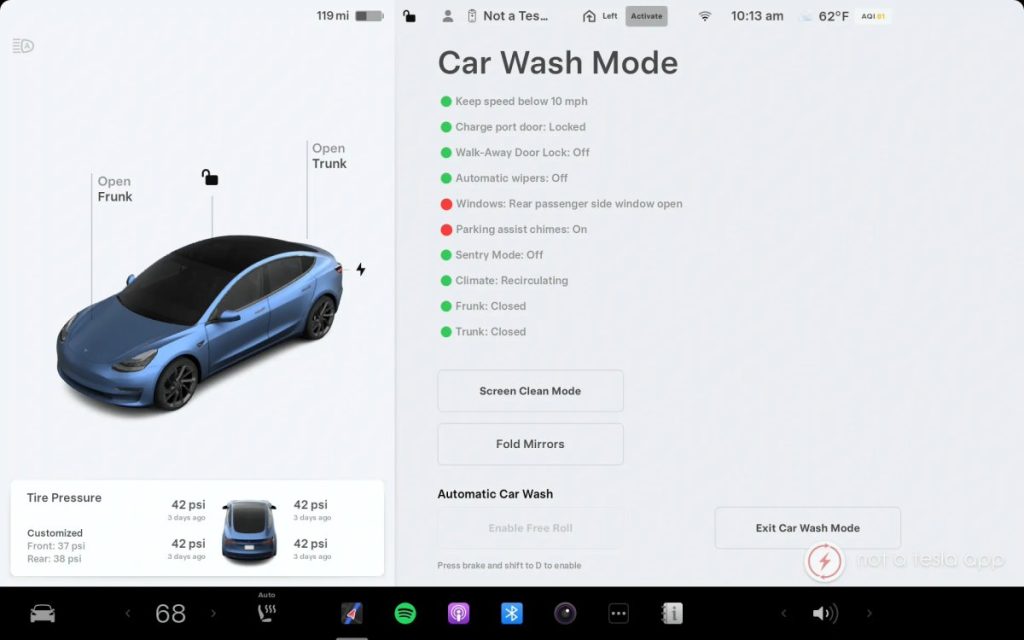
You’ve got a Tesla, and it’s more than just a car; it’s a marvel of modern technology. But even the most advanced vehicles require a little hands-on attention, like knowing how to turn off car wash mode.
You might find yourself puzzled by this feature, wondering what it does and why you need it. Imagine pulling up to a car wash and feeling confident, knowing exactly what to do. This quick guide will walk you through the simple steps to ensure your Tesla is ready for a wash, saving you time and hassle.
Dive in, and you’ll discover the ease of mastering your Tesla’s settings, ensuring your sleek ride gets the care it deserves without any hiccups. Ready to make car washes a breeze? Let’s get started!
Accessing Car Wash Mode
Access the car’s control menu on the touchscreen to turn off Tesla’s Car Wash Mode. Navigate to the “Service” section, then select “Car Wash Mode” and tap “Off. “
Accessing Car Wash Mode on your Tesla is a straightforward process that ensures you can clean your vehicle safely without worrying about damaging any components. Whether you’re new to Tesla or just need a refresher, knowing how to navigate through the digital interface is essential. Let’s dive into the simple steps to access Car Wash Mode.Locate The Controls Menu
Begin by sitting in the driver’s seat and turning on your Tesla’s touchscreen. The Controls Menu is your gateway to various settings, including Car Wash Mode. Look for the icon that resembles a car or a control panel; this is usually located on the bottom left of the screen.Select Service Options
Once you’re in the Controls Menu, navigate to the “Service” tab. This section houses all the maintenance settings for your Tesla, including the Car Wash Mode. By selecting this option, you prepare your vehicle for a seamless car wash experience. Navigating through your Tesla’s settings might seem daunting at first, but it’s designed to be intuitive. Ever found yourself wondering why there are so many settings? Each one has a purpose, ensuring that your car runs smoothly and efficiently. Accessing Car Wash Mode is just one of the many features that make owning a Tesla a unique experience.
Credit: www.reddit.com
Deactivating Car Wash Mode
Deactivating Car Wash Mode on a Tesla involves accessing the car’s touchscreen. Simply tap on ‘Controls,’ then select ‘Service,’ and turn off the Car Wash Mode. This process ensures your Tesla is ready to drive away safely.
Deactivating Car Wash Mode on your Tesla is a straightforward process that ensures your vehicle returns to its regular settings after a wash. This feature is designed to protect your car’s components during cleaning, but knowing how to turn it off correctly is just as essential. Whether you’re a seasoned Tesla owner or new to the brand, understanding these steps can save you time and keep your car in optimal condition. Imagine you’ve just finished cleaning your car, and now it’s time to revert to your everyday driving setup.Tap Car Wash Mode Button
To turn off Car Wash Mode, locate the Car Wash Mode button on your Tesla’s touchscreen. It’s typically found within the service menu. A simple tap is all it takes. Once you touch the button, your Tesla begins the transition away from wash settings. Keep an eye on the screen for any prompts that indicate the mode has been disabled.Confirm Deactivation
After tapping the button, it’s crucial to confirm that Car Wash Mode is indeed turned off. Look for a confirmation message on the screen that verifies the mode has been deactivated. Have you checked if the features affected by Car Wash Mode, like the mirrors and wipers, are back to normal? If not, take a moment to ensure they are functioning as expected. By following these steps, you ensure your Tesla is ready for the road again. Have you ever found yourself stuck with unexpected settings after a wash? Share your experiences and tips below!Common Issues And Solutions
Car Wash Mode on a Tesla can help protect your vehicle during washes. Yet, turning it off sometimes presents challenges. Many Tesla owners face common issues. Here, we explore these problems and offer simple solutions.
Resolving Inactive Touchscreen
An inactive touchscreen can frustrate Tesla owners. First, ensure your car is in Park mode. Try a soft reset by holding both scroll wheels on the steering wheel. Wait until the screen turns off and back on. This often resolves touchscreen issues.
Check for system updates if the problem persists. Navigate to the ‘Software’ tab on your screen. Download and install available updates. Keeping your software current can prevent future screen issues.
Handling Software Glitches
Software glitches might hinder Car Wash Mode functions. Restart your Tesla to clear minor bugs. Place the car in Park, then hold the brake pedal. Press the power off button in the settings menu.
Wait for a few minutes, then restart the vehicle. This reset can fix many software-related issues. If problems continue, contact Tesla support for assistance. They might suggest further troubleshooting steps.

Credit: www.youtube.com
Tips For Safe Car Washing
Turning off car wash mode in your Tesla is simple. Access the menu on the screen, find ‘Car Wash Mode,’ and tap to deactivate it. Ensure your Tesla is ready for a safe wash without any automated features interfering.
Washing your Tesla carefully ensures it stays in top condition. While the car wash mode is useful, knowing how to safely wash your car is crucial. This guide provides useful tips and reminders to help you achieve a spotless finish without risking any damage. Let’s explore some essential steps for safe car washing.Pre-wash Checklist
Before you start washing, gather all necessary supplies. Ensure you have a microfiber cloth, a gentle car shampoo, and a bucket of clean water. Check that all windows and doors are securely closed. Ensure the car wash mode is activated to protect sensitive parts. Look for any dirt or debris on the car that could scratch the paint. Remove any loose items from the vehicle’s exterior.Post-wash Precautions
After washing, rinse the car thoroughly to remove soap residue. Use a soft towel to dry the surface, preventing water spots. Check that mirrors and sensors are clean and clear. Ensure all parts of the car are dry before driving. Inspect the car for any missed spots that may need further cleaning. Turn off the car wash mode and ensure everything is in order.Understanding Tesla’s Car Wash Features
Tesla has revolutionized the automotive industry with its innovative features, and one that stands out for practicality is the Car Wash Mode. If you’re a Tesla owner, you know that maintaining your vehicle’s pristine condition is not just about aesthetics; it’s about preserving its value and performance. Understanding Tesla’s car wash features can help you make the most out of your cleaning routine, ensuring your car remains as sleek and efficient as the day you drove it off the lot.
Overview Of Car Wash Mode
Car Wash Mode in Tesla vehicles is designed to make your car cleaning experience seamless and effective. This mode adjusts certain settings to prevent unwanted movements and protect sensitive areas of the vehicle. For example, it can deactivate the windshield wipers and automatically close windows to prevent water intrusion. It also locks the charge port, ensuring that it remains sealed during the wash.
These automatic adjustments are particularly useful when using automatic or touchless car washes. They minimize the risk of damage and ensure that your car is ready for thorough cleaning without interruptions. Have you ever driven into a car wash only to find your wipers going haywire? With Car Wash Mode, those worries are a thing of the past.
Benefits Of Using Car Wash Mode
Utilizing Car Wash Mode offers several advantages that make it a must-use feature for Tesla owners. Firstly, it reduces the likelihood of mechanical issues during the wash process. This can save you from costly repairs and headaches down the road. By automatically adjusting the mirrors and locking the charge port, you protect vital components from potential harm.
Moreover, Car Wash Mode enhances the overall washing experience by ensuring your vehicle is prepared for a thorough clean. It eliminates the need to manually adjust settings each time you drive into a car wash. This convenience can save you time and effort, allowing you to focus on other aspects of your day.
Ever wondered if skipping this mode might affect your Tesla’s performance or longevity? It’s worth considering how small adjustments can make a significant impact on your vehicle’s maintenance. By using Car Wash Mode, you take a proactive step in safeguarding your investment.
Credit: insideevs.com
Frequently Asked Questions
How To Disable Tesla Car Wash Mode?
To disable Tesla’s car wash mode, access the car’s touchscreen. Navigate to the “Service” menu and select “Car Wash Mode. ” Simply tap on it to toggle it off. Ensure the mode is deactivated before starting your drive to maintain optimal vehicle performance.
Why Use Car Wash Mode On A Tesla?
Car wash mode on a Tesla helps protect your vehicle during automated washes. It locks the charge port, folds mirrors, and disables automatic wipers. This mode ensures your Tesla remains safe from potential damage and optimizes the washing process.
Can I Drive With Car Wash Mode On?
No, you should not drive with car wash mode on. This mode is specifically designed for stationary use during car washes. Driving with it activated can affect vehicle performance and safety features, so ensure it’s turned off before driving.
Does Car Wash Mode Affect Tesla’s Battery?
Car wash mode does not significantly impact Tesla’s battery. It’s a temporary setting designed for safety during car washes. While it’s active, certain features like automatic wipers are disabled, but it doesn’t drain or affect the battery’s overall performance.
Conclusion
Turning off Car Wash Mode in a Tesla is easy. Just follow the steps outlined in this guide. This ensures your car remains safe during washing. Always check your screen for confirmation. This prevents any issues. Keeping your Tesla in top shape is important.
Simple actions like these help maintain your vehicle. Regular care extends its lifespan. Remember, a well-maintained Tesla performs better. So, enjoy a smooth ride. Now, you’re ready to handle your car wash days. Your Tesla will thank you for it.
Stay informed and drive with confidence.