
Imagine cruising down the highway with a dash cam quietly recording every moment. You may never have thought of installing one, but a dash cam can be your silent witness, providing crucial evidence in unexpected situations.
Whether you’re involved in a traffic incident, want to capture stunning road trips, or simply boost your peace of mind, a dash cam is your trusty companion. But how do you put a dash cam in your car? It might seem daunting, but it’s easier than you think.
With just a few simple steps, you can have your dash cam up and running in no time. Stick with us, and you’ll learn how to seamlessly integrate this tech marvel into your vehicle, ensuring you never miss a moment behind the wheel.
Choosing The Right Dash Cam
Choosing the right dash cam for your car can feel like navigating a maze. With a plethora of options available, it’s crucial to focus on what matters most to you. Do you want a device that simply records your drive, or are you looking for added features like GPS tracking and night vision? Let’s break down the essentials to help you make an informed decision.
Types Of Dash Cams
Dash cams come in various types, each catering to different needs. The most common type is the single-channel dash cam, which records the view through your vehicle’s front windshield. It’s an excellent choice if you mainly want to capture incidents ahead of you.
If you’re concerned about rear-end accidents or want a full view of both the road and inside the cabin, consider a dual-channel dash cam. This type records both the front and rear views, offering you comprehensive coverage.
For those of you who prioritize stealth and aesthetics, a discreet dash cammight be the way to go. These are designed to blend seamlessly with your car’s interior, reducing the likelihood of theft.
Key Features To Consider
Before you make a purchase, think about what features are non-negotiable for you. Resolution is key; a dash cam with at least 1080p HD ensures you capture clear footage. However, if you drive a lot at night, look for a cam with night vision capabilitiesto ensure visibility.
Consider the storage options. Some dash cams come with internal storage, while others rely on SD cards. A continuous loop recording feature can also be beneficial, ensuring you always have the most recent footage without worrying about storage space running out.
Other handy features include GPS trackingto log your route and speed, and a g-sensorthat automatically saves footage when a sudden impact is detected.
Budget And Quality Balance
Setting a budget is wise, but remember that quality shouldn’t be compromised. Ask yourself what you’re willing to spend and what you expect in return. High-quality dash cams might cost more, but they can offer better reliability and features.
Look for brands that offer good warranties and customer support. Sometimes spending a little extra on a trusted brand can save you from headaches down the road. Weigh the importance of features against your budget; perhaps a mid-range dash cam offers the balance you need.
Remember, the most expensive option isn’t always the best fit. Determine what features are truly essential to you and find a dash cam that meets those needs without breaking the bank.
Preparing For Installation
Preparing for Installation Gather all necessary tools before installing your dash cam. Ensure your car is parked in a safe area. Clear the dashboard and windshield for easy access and optimal camera placement.
Preparing to install a dash cam in your car is an important step. Proper preparation ensures a smooth installation process. You’ll need to gather tools, choose a location, and understand your car’s interior.Gathering Necessary Tools
Start by collecting essential tools. You will need a screwdriver and a cable management kit. These tools help secure and hide wires. A microfiber cloth is useful for cleaning your dashboard. Make sure you have adhesive mounts or suction cups for the camera. Check if your dash cam needs a memory card.Finding The Best Location
Choose a spot where the camera gets a clear view of the road. The center of the windshield is ideal. Avoid placing it near air vents or in blind spots. Make sure the camera doesn’t block your view. Check for local laws on dash cam placement. Ensure easy access to the camera for adjustments.Understanding Your Vehicle’s Interior
Familiarize yourself with your car’s interior layout. Identify power sources for the dash cam. Most cams plug into the cigarette lighter socket. Check for USB ports if available. Know where cables can be tucked away neatly. Consider the length of wires when planning cable routes. Understanding your car’s interior helps with a cleaner installation.Installing The Dash Cam
Installing a dash cam enhances your driving safety. Begin by selecting a suitable spot on the windshield. Secure the device using the adhesive mount, and connect it to the car’s power supply.
Installing a dash cam in your car is a smart move for safety and security. It can provide crucial evidence in the event of an accident or dispute. But to get the most out of your dash cam, you must install it correctly. Let’s dive into the steps to make sure your dash cam is positioned perfectly and powered efficiently.Mounting The Dash Cam
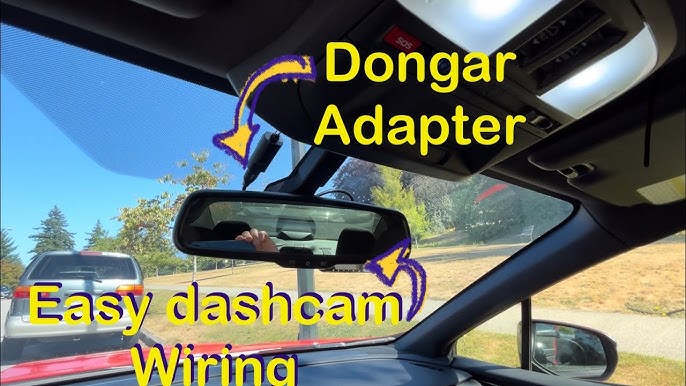
Start by choosing the ideal spot for your dash cam. The best location is usually just behind the rearview mirror. This keeps it discreet yet effective in capturing the road ahead. Clean the windshield to ensure the adhesive sticks well. Attach the mount and ensure the camera is level. Test the view by powering on the dash cam and adjusting until you have a clear, unobstructed view.Routing The Power Cable
Routing the power cable neatly is essential for both aesthetics and safety. Begin by tucking the cable into the headliner along the top of the windshield. This keeps it out of sight and prevents any distractions. Next, guide the cable down the A-pillar. Be cautious if your car has airbags here; avoid interfering with them. Continue routing the cable under the dashboard towards the power source.Connecting To The Power Source
You have a few options for powering your dash cam. The easiest method is to use the car’s cigarette lighter socket. Plug in the adapter and ensure the connection is secure. For a more permanent solution, consider hardwiring your dash cam to the car’s fuse box. This requires a bit more effort but keeps your power source hidden and your dash clutter-free. Always consult your car’s manual or a professional if you’re unsure about this step. Have you ever thought about how easily a dash cam could save you from a sticky situation? With these installation tips, you’re not just setting up a gadget—you’re investing in peace of mind.
Credit: www.youtube.com
Setting Up The Dash Cam
Secure the dash cam on the windshield, ensuring a clear view of the road. Connect the power cable to the car’s charging port for consistent power supply. Adjust the camera angle for optimal recording.
Setting up a dash cam is crucial for capturing clear footage. Proper installation ensures the camera works efficiently and records vital moments. This section guides you through configuring settings, adjusting angles, and testing the recording function.Configuring Camera Settings
Begin by accessing the camera’s menu. Set the resolution to high for clear images. Choose a frame rate that matches your needs. Adjust the date and time settings accurately. Enable loop recording to overwrite old footage automatically. If your dash cam supports GPS, turn it on for location tracking.Adjusting The Viewing Angle
Position the dash cam on the windshield. Ensure it doesn’t obstruct your view. Tilt the camera to cover the road fully. Check both the hood and sky are visible. Adjust the angle to minimize glare. Ensure the lens is clear of any obstructions. Test the angle to capture both sides of the road.Testing The Recording Function
Activate the dash cam. Drive a short distance to check video quality. Review footage to ensure clarity. Listen for any audio issues. Confirm the camera records without interruption. Check the saved files on the memory card. Ensure the camera starts recording automatically with the ignition.Maintaining Your Dash Cam
Proper installation of a dash cam ensures clear video recording. Position it near the rearview mirror for the best view. Secure wiring neatly along the windshield and dashboard to avoid distractions.
Maintaining your dash cam is essential for optimal performance. Regular upkeep ensures that your device captures vital footage whenever needed. It also extends the lifespan of your dash cam.Regular Software Updates
Software updates are crucial for your dash cam. They improve functionality and fix bugs. Check for updates every month. Visit the manufacturer’s website for the latest version. Download and install it safely. Most updates are straightforward and automatic. Follow instructions provided by the manufacturer.Cleaning And Care Tips
Dust and grime can affect your dash cam’s lens. Clean it regularly using a microfiber cloth. Avoid using harsh chemicals. They can damage the lens. Ensure the suction mount is secure. A loose mount can cause shaky footage. Inspect the power cable for wear and tear. Replace it if necessary to avoid connection issues.Troubleshooting Common Issues
Sometimes, dash cams face minor problems. Here are quick solutions. If it doesn’t turn on, check the power connection. Ensure the cable is plugged in properly. If footage is blurry, clean the lens. Regularly check the memory card. Format it if the device stops recording. Reset the device to fix persistent issues. Follow the user manual for specific instructions.
Credit: cansonic.com

Credit: www.youtube.com
Frequently Asked Questions
What Tools Are Needed For Dash Cam Installation?
To install a dash cam, you’ll need basic tools like a screwdriver, adhesive mounts, and cable clips. Some dash cams come with these accessories. Ensure your car’s power outlet is accessible for the dash cam’s power source. A clean microfiber cloth helps prepare surfaces for adhesive mounts.
Can I Install A Dash Cam Myself?
Yes, you can install a dash cam yourself with basic tools. Follow the manufacturer’s instructions carefully. Most dash cams are designed for easy installation. Make sure to route cables neatly to avoid obstructing your view. If unsure, consult a professional for assistance.
How Do I Position The Dash Cam Correctly?
Mount the dash cam on the windshield, near the rearview mirror. Ensure it doesn’t obstruct your view while driving. Check the camera angle to capture the road clearly. Some dash cams have adjustable mounts for better positioning. Test the footage to confirm optimal placement.
How Do I Hide Dash Cam Cables?
Use cable clips to secure cables along the edge of the windshield. Tuck cables under the car’s interior panels for a cleaner look. Adhesive cable mounts can help manage loose wires. Proper cable management prevents interference with driving and maintains a tidy appearance.
Conclusion
Installing a dash cam is simpler than it seems. With the right tools, you can set it up in no time. Ensure the camera has a clear view of the road. This helps in capturing important footage. Secure the wires to prevent distractions.
Regularly check its functionality for reliable performance. A dash cam enhances your driving safety. Peace of mind for every journey. Whether for evidence or safety, it’s a valuable addition. Start today for a safer drive tomorrow. Happy and safe driving!