
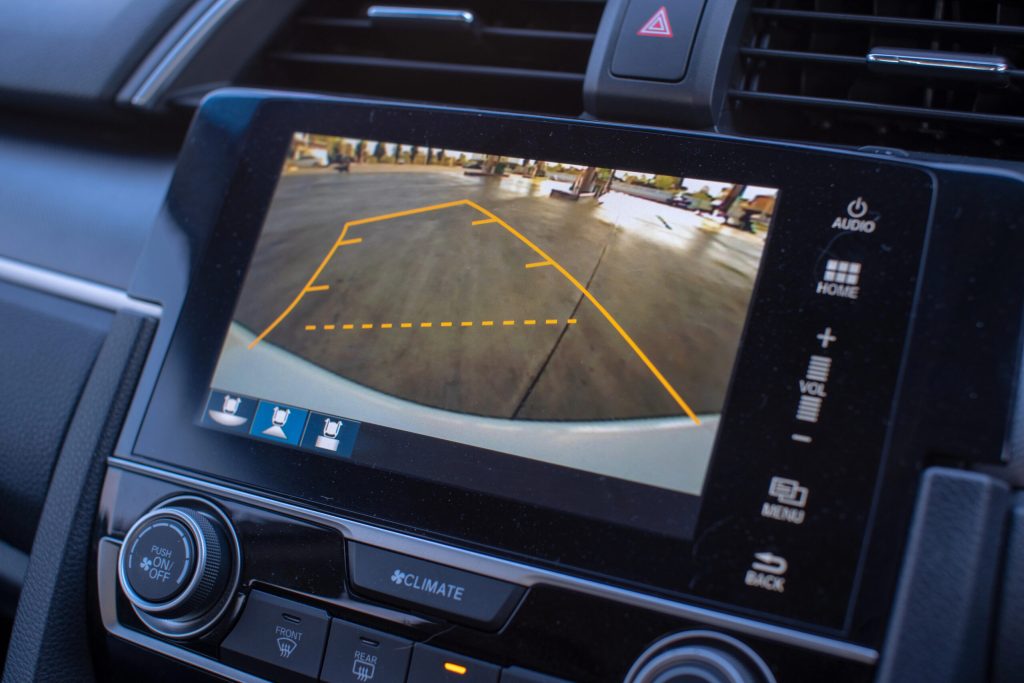
Imagine reversing your car without the constant worry of hitting something. With a backup camera, this can become your reality—even if you drive an older car.
You might think adding modern technology to your vintage vehicle is complicated or expensive, but it’s easier than you might expect. This guide will show you simple steps to install a backup camera, transforming your driving experience. Picture yourself parking effortlessly, seeing everything behind you clearly.
Your stress and anxiety about blind spots will melt away. Dive into this article and discover how you can upgrade your car’s safety and convenience with ease. Are you ready to make driving more enjoyable and secure? Let’s get started!
Benefits Of A Backup Camera
Enhance safety by adding a backup camera to your older car. It reduces blind spots and helps avoid obstacles. Parking becomes easier, giving you peace of mind on the road.
Installing a backup camera in your older car can enhance your driving experience. It offers significant benefits that contribute to safety and convenience. A backup camera provides a clearer view of what lies behind your vehicle. This can reduce accidents and make parking easier.Improved Safety
A backup camera improves safety by reducing blind spots. It helps prevent collisions with obstacles or pedestrians. This can be especially helpful in busy areas or crowded parking lots. Drivers can react faster to unexpected movements behind the car.Easier Parking
Parking becomes much simpler with a backup camera. It provides a real-time view of the space behind your car. This makes it easier to judge distances and angles. Parallel parking becomes less stressful and more accurate.Protects Your Vehicle
A backup camera helps avoid minor accidents that cause dents or scratches. It keeps your vehicle in better condition. This can save money on repairs and maintain the car’s value over time.Increased Confidence
Drivers gain confidence when reversing with a backup camera. It provides visual assistance that reinforces decision-making. This leads to smoother and more precise maneuvers. Drivers feel more in control, even in tight spaces.Enhanced Driving Experience
The driving experience becomes more enjoyable with a backup camera. It adds a modern touch to older vehicles. This small upgrade can make driving feel more secure and comfortable. It enhances the overall satisfaction of driving your car.Types Of Backup Cameras
Upgrading your older car with a backup camera can be a game-changer for safety and convenience. But did you know there are different types of backup cameras available for your vehicle? Understanding these options can help you make the best choice for your car and driving needs. Let’s dive into the two main types: wired and wireless cameras.
Wired Cameras
Wired backup cameras are known for their reliable video transmission. They connect directly to your car’s display or a separate monitor via cables. This ensures a stable image without interference, which is crucial for accurate parking and maneuvering.
Installation might seem daunting, but it’s straightforward with the right tools. You may need to run wires through your car’s interior, which requires some disassembly. However, many car enthusiasts enjoy the challenge and satisfaction of doing it themselves.
Think of wired cameras as the dependable choice. They offer consistent performance even in areas with heavy wireless signal congestion. If you’re comfortable with a bit of DIY, a wired camera could be your best bet.
Wireless Cameras
Wireless backup cameras are all about convenience. They transmit video signals over wireless frequencies to your car’s display. This means less hassle with wires and a quicker installation process.
Imagine being able to set up a camera without tearing your car apart. It’s a tempting option for those less inclined to tackle wiring projects. However, consider the potential for signal interference, which can occasionally disrupt the video feed.
Wireless cameras are ideal for those who value ease of installation over the slight risk of signal issues. They suit older cars where running cables might be more complicated due to design constraints.
Which type of backup camera aligns with your priorities? Reliability or convenience? Assess your comfort level with car modifications and the driving environments you frequent. Your choice will ultimately enhance your driving experience.
Choosing The Right Camera
Adding a backup camera to an older car is a smart choice. It enhances safety and convenience. The key to success is choosing the right camera. This section guides you on what to consider for compatibility and features.
Compatibility With Your Car
Not all backup cameras fit every car. Check your car’s model and year. Ensure the camera system matches your car’s electrical setup. Some cameras need specific wiring or mounts. Verify the camera fits your dashboard or rear view mirror. Consider installation ease. Some cameras are plug-and-play, while others need professional help.
Camera Features To Consider
Look for essential camera features. Image quality matters. Choose cameras with high resolution for clear visuals. Night vision is crucial. It helps in low-light conditions. Consider the viewing angle. A wide-angle lens offers more visibility. Weatherproof cameras last longer. They withstand harsh conditions. Wireless cameras reduce cable clutter.

Credit: www.tiktok.com
Tools And Materials Needed
Installing a backup camera on an older car requires basic tools like a screwdriver and drill. Essential materials include a compatible camera kit, wiring harness, and monitor. These items ensure a smooth installation process, enhancing your vehicle’s safety features.
Installing a backup camera on your older car is a smart move that enhances safety and convenience. Before you dive into this project, it’s crucial to gather the right tools and materials. Having everything you need at your fingertips will make the installation process smooth and enjoyable. Plus, it saves you from those frustrating moments when you realize you’re missing a crucial item halfway through the job. Let’s break down the essentials you’ll need to ensure your backup camera installation is successful.Essential Tools
First, you’ll need a screwdriver set. Most installations require removing panels or securing the camera, and screwdrivers are your go-to for these tasks. A drill with drill bits is also vital. Depending on your car model, you may need to drill holes to secure the camera or route the wires. Don’t forget a wire stripper. This tool is crucial for connecting the camera’s wires to your car’s power source or display. A multimeter can be helpful to ensure the wiring connections are correct and to troubleshoot any electrical issues. Finally, a panel removal tool will make it easier to safely remove interior panels without causing damage.Additional Materials
You’ll need the backup camera kit itself, which typically includes the camera, cables, and a monitor if your car doesn’t have a built-in display. Electrical tape is essential for securing wire connections and preventing short circuits. Stock up on zip ties to tidy up any loose wires and keep them out of the way. A fuse tap might be required to safely connect the camera to your car’s electrical system. Consider using a gasket or sealant to protect any drilled holes from water ingress. Having these tools and materials ready not only saves time but also makes the installation process straightforward and stress-free. What’s the most challenging tool or material you’ve had to use? Share your experiences and tips in the comments below!Installation Process
Installing a backup camera on your older car can enhance your driving experience and improve safety. The process might seem daunting, but with a bit of patience and the right tools, you can do it yourself. Let’s dive into the installation process, breaking it down into manageable steps.
Mounting The Camera
Begin by deciding on the optimal location for your camera. Most drivers prefer placing it near the license plate for a central rear view.
Use screws or adhesive mounts to secure the camera firmly. Ensure it’s level for the best angle.
Consider the camera’s exposure to elements; it should be weather-resistant to withstand rain or snow.
Wiring The Camera
Once mounted, it’s time to route the wiring. Start by threading the wire through the trunk, carefully avoiding any sharp edges.
You may need to remove interior panels to hide the wires. This keeps things tidy and prevents accidental damage.
Connect the power wire to your car’s reverse light. This ensures the camera activates when you shift into reverse.
Connecting To The Display
Now, focus on connecting the camera to your display screen. Many opt for dashboard mounts or integration with existing screens.
Use the RCA cables to connect the camera output to the display input. Check compatibility to avoid connectivity issues.
Test the system by turning on your car and putting it in reverse. Adjust the display settings for optimal clarity.
Are you ready to transform your driving experience with this new addition? Taking these steps can lead to a safer and more enjoyable journey. Have you thought about where you’ll install the display screen in your car? Share your insights or concerns in the comments below!
Testing And Adjustments
Testing and Adjustments Fine-tune your backup camera for better performance. Check camera angles and adjust to ensure clear visibility. Make necessary tweaks to the display settings.
After successfully installing a backup camera on your older car, the next crucial step is ensuring it functions properly. Testing and adjustments are vital for optimal performance and safety. A properly aligned and adjusted camera can make all the difference when reversing or parking your car.Checking Camera Alignment
First, verify that the camera is perfectly aligned. Misalignment can lead to distorted images or blind spots. To check alignment, park your car on a flat surface. Use a measuring tape to ensure equal distance from the ground on both sides of the camera. If the image appears tilted, adjust the camera mount. Many mounts have adjustable screws that you can tighten or loosen to achieve the right alignment.Adjusting Viewing Angles
Once aligned, focus on adjusting the viewing angles. A wide-angle view can help you see more of what’s behind your car. Access the camera’s settings via the display screen in your car. Here, you can usually find options to adjust the field of view. Experiment with different angles by reversing your car in an open space. Notice how much of the surroundings you can see and adjust accordingly. Does the camera provide a clear view of obstacles? If not, tweak the angles until it feels just right. Your comfort and safety are paramount, so take the time to get it right. These simple tests and adjustments can significantly enhance your driving experience. Have you noticed any differences in your reversing skills after setting up your camera?Troubleshooting Common Issues
Installing a backup camera on an older car can prevent common issues. Ensure compatibility with your car’s system. Connect wiring correctly to avoid malfunctions.
Installing a backup camera on an older car is a smart move. It improves safety and convenience. Yet, some issues may arise during or after installation. Troubleshooting these common problems ensures your camera works correctly.Image Quality Problems
Blurry or unclear images can be frustrating. First, check the camera lens. Dirt or moisture can blur the image. Clean the lens gently with a soft cloth. Ensure the lens is not scratched. A damaged lens needs replacement. Next, inspect the camera angle. Adjust it if necessary. The camera should point slightly downward. This reduces glare and improves visibility. Check the monitor settings. Adjust brightness and contrast for a clearer picture.Signal Interference
Signal interference often affects wireless cameras. Check for obstacles between the camera and monitor. Metal or thick walls can disrupt the signal. Try repositioning the monitor for a better signal path. Electronic devices can cause interference too. Keep them away from the camera’s signal path. Sometimes, changing the wireless channel helps. Refer to the camera’s manual for instructions on channel settings. If the interference persists, consider using a wired connection. Wired connections provide a stable and clear image. This might involve running a cable from the camera to the monitor. It requires a bit more effort but often solves signal issues.
Credit: www.tiktok.com
Maintenance Tips
Installing a backup camera enhances safety in older cars. Begin by selecting a compatible camera kit. Follow the instructions to mount the camera and connect it to the car’s wiring system. Finally, test the camera to ensure it functions correctly.
Regular maintenance checks will keep it working efficiently.
Maintaining your newly installed backup camera can ensure it functions optimally and lasts longer. Just like any other car accessory, your backup camera needs regular attention to perform at its best. Here are some practical maintenance tips to keep your backup camera in top condition.Regular Cleaning
Dust and grime can obscure your camera’s lens, making the video feed unclear. Wiping it clean regularly can prevent this issue. Use a soft cloth or a microfiber towel to gently clean the lens. Avoid using harsh chemicals that could damage the lens. A simple mixture of water and mild soap works wonders. It’s surprising how a clean lens can enhance your driving experience by providing a clear and bright view.Software Updates
If your backup camera system includes software, keeping it updated is crucial. Manufacturers often release updates to improve performance or add new features. Check the manufacturer’s website or contact customer support to see if there are updates available for your model. Installing updates is usually a straightforward process, often involving a USB stick or a simple download. By keeping your software updated, you ensure that your backup camera is running efficiently. Have you ever wondered if a small update could enhance your system’s performance significantly? Sometimes, it’s the small tweaks that make a big difference.
Credit: www.youtube.com
Frequently Asked Questions
What Tools Are Needed To Install A Backup Camera?
To install a backup camera, you’ll need basic tools like screwdrivers, a drill, wire strippers, and electrical tape. Additionally, a multimeter can help with troubleshooting. These tools ensure a safe and secure installation, allowing you to connect the camera to your car’s electrical system effectively.
Can A Backup Camera Fit Any Older Car?
Yes, a backup camera can fit most older cars. Compatibility depends on the camera model and your car’s electrical system. Universal cameras are available, which suit various vehicles. Ensure you check the camera specifications and your car’s setup before purchasing for a smooth installation.
How Long Does Installation Typically Take?
Installing a backup camera typically takes around 2 to 4 hours. The duration depends on your experience and the complexity of your car’s wiring. Following detailed instructions can streamline the process. Ensuring all components are securely connected is crucial for effective camera operation.
Do I Need Professional Help For Installation?
Professional help isn’t necessary for installation, but it can be beneficial. If you’re unfamiliar with car wiring, a professional ensures a safe and efficient setup. DIY enthusiasts can follow online guides. Make sure to check compatibility with your car model before proceeding on your own.
Conclusion
Adding a backup camera to your older car is simple and smart. It boosts safety and confidence while driving. No need to worry about tricky installations. Just follow the steps outlined. You’ll find it an easy project with great benefits.
Soon, reversing will feel much safer. Plus, it’s a cost-effective way to upgrade your vehicle. Enjoy the peace of mind a backup camera provides. Start today and enhance your driving experience. Safety and convenience are within reach. Your older car can feel new again with this easy addition.