
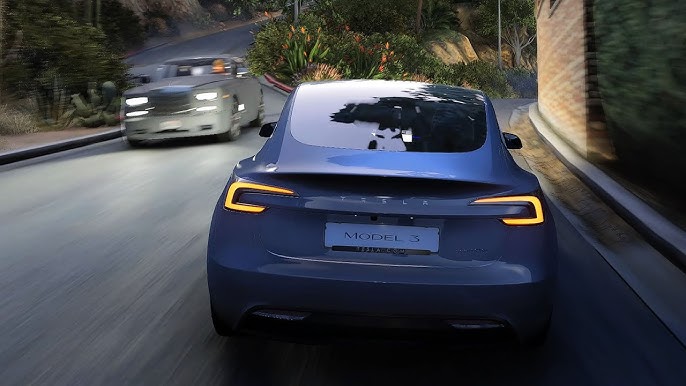
Imagine cruising through the vibrant streets of Los Santos in GTA, with your car gleaming under the city lights. You notice the jaw-dropping reflections on your vehicle, making it look almost real.
Achieving this level of detail in car reflections can transform your gaming experience, pulling you deeper into the virtual world. If you’ve ever wondered how to get the best car reflection in GTA, you’re in the right place. This guide is designed to help you unlock the secrets to enhancing your vehicle’s visuals, making your in-game rides look stunningly lifelike.
You’ll discover simple tweaks and settings that can make a massive difference, and you’ll be surprised at how easy it is to elevate your gameplay. Are you ready to turn heads with your dazzling car reflections? Let’s dive into the details and get your game looking better than ever!

Credit: www.reddit.com
Graphics Settings Optimization
Optimizing your graphics settings in GTA can dramatically enhance the visual experience, making car reflections look stunningly realistic. By adjusting certain parameters, you can balance performance and aesthetics, creating a seamless gaming experience. Let’s dive into some key graphics settings that can help you get the best car reflections in GTA.
Adjusting Resolution
Resolution plays a crucial role in how clear and detailed the game looks. Increasing your resolution will enhance the sharpness of the reflections on your car’s surface. If your system can handle it, consider setting your resolution to the highest level supported by your monitor.
However, higher resolution demands more from your GPU, which might affect performance. If you notice any lag, you might need to find a sweet spot between resolution and frame rate. Remember, smoother gameplay often trumps slightly better visuals.
Enhancing Texture Quality
Texture quality directly impacts the detail level of surfaces, including car reflections. Set your texture quality to high or ultra to see a noticeable difference in the realism of car reflections. This setting ensures that every surface, from the paint job to the tiniest details, looks lifelike.
If your system struggles with high texture settings, you might experience stuttering or delayed loading times. It’s essential to test different settings to see what your system can handle without sacrificing playability. Sometimes, a moderate setting can provide a balanced visual experience.
Tweaking Shadow Settings
Shadows add depth and realism to car reflections, giving them a more dynamic appearance. By adjusting shadow settings to a higher level, you can create more realistic lighting effects on your vehicle. This change can significantly impact how reflections behave, especially in different lighting conditions.
However, high shadow settings can be taxing on your system’s performance. You might need to experiment with medium settings if you notice any frame drops. Consider whether the trade-off between shadow quality and game smoothness is worth it for your gameplay style.
Have you ever noticed how a slight tweak in settings can bring your gaming experience to life? Try these optimizations and watch your car reflections in GTA transform into a visual masterpiece.
Advanced Rendering Techniques
Achieving the best car reflections in GTA involves tweaking the game’s graphics settings. Increasing reflection quality enhances realism. Experimenting with different angles and lighting conditions also helps capture stunning visual effects.
Advanced rendering techniques in GTA can enhance visual realism. They make car reflections pop, adding depth and immersion. By tweaking settings, players can experience stunning graphics. These techniques are not just for tech-savvy gamers. Anyone can use them to see cars in a new light. Let’s explore how to elevate your game’s visual appeal.Enabling Ray Tracing
Ray tracing simulates how light behaves in reality. It tracks rays from their source to objects. This creates lifelike shadows and reflections. To enable ray tracing, access your game settings. Look for graphics options and toggle ray tracing on. This improves reflection quality significantly. Your car will shine with realistic light interactions.Using Anti-aliasing
Anti-aliasing smooths out jagged edges. It helps in making reflections clearer. In the settings menu, find anti-aliasing options. Choose a higher level for better visuals. This reduces pixelation in reflections. Cars appear more polished and detailed. Anti-aliasing enhances overall visual fidelity.Reflections And Refractions
Reflections show how light bounces off surfaces. Refractions deal with light passing through materials. Adjust your settings for both to enhance car aesthetics. Increase reflection quality for sharper images. Refraction settings help with transparent materials like glass. Your car’s windows will look more realistic. These adjustments add depth to your driving experience.Modifications And Enhancements
Getting the best car reflection in GTA can be a game-changer for your visual experience. Modifications and enhancements can drastically improve the realism and aesthetics of your virtual vehicle. Whether you’re admiring your ride during a sunset drive or showcasing it in a high-speed chase, enhancements make every detail pop. Let’s explore how you can achieve those stunning reflections with some straightforward techniques.
Installing Reflection Mods
Reflection mods are a great way to enhance the details of your car’s surface. These mods often include improved textures and lighting effects that make your car look more lifelike. Start by searching for popular mods on gaming forums and websites dedicated to GTA enthusiasts.
Download the mod files and follow the installation instructions carefully. Make sure to back up your game files before making any changes. You don’t want to lose any progress or damage your game. Once installed, take your car for a spin and notice the difference in how light interacts with its surface.
Custom Shader Packs
Custom shader packs can transform the way reflections appear in your game. These packs tweak the graphical settings to provide a more polished look. Many shader packs are designed to work seamlessly with the game’s existing graphics engine.
Look for shader packs that are compatible with your version of GTA. Download the pack and integrate it into the game by following the provided guidelines. Experiment with different settings to find the perfect balance for your system. The right shader pack can make your car’s reflection look mirror-like.
Using Enb Series
ENB Series is a popular graphics modification tool that enhances visual effects in many games, including GTA. It offers extensive customization options for lighting, shadows, and reflections. If you’re keen on getting the best car reflection, ENB Series is a powerful tool to consider.
Begin by downloading ENB Series from a trusted source. The tool often requires some configuration to suit your preferences. Adjust the reflection settings and see how they affect your car’s appearance. With the right tweaks, ENB Series can make your car look stunning, especially in dynamic lighting conditions.
Have you tried any of these enhancements yet? Which one gave your car the best reflection? Share your experiences or tips in the comments below!
Hardware Considerations
Getting the best car reflection in GTA requires more than just tweaking in-game settings. Your hardware plays a crucial role in achieving those jaw-dropping visuals. Understanding the right components can elevate your gaming experience to the next level.
Graphics Card Requirements
The graphics card is the heart of your gaming setup. For optimal reflections in GTA, you’ll need a card that supports ray tracing. Consider models like the NVIDIA RTX series or AMD’s latest offerings. These cards handle complex lighting and reflections effortlessly, making your in-game cars look stunning.
Check the specifications of your current card. Ensure it meets the game’s recommended requirements. This step can prevent lag and maintain smooth gameplay while enjoying high-quality reflections.
Impact Of Cpu And Ram
Your CPU and RAM are equally important. While the graphics card handles visuals, the CPU processes game data. A fast CPU ensures that your game runs smoothly, even in high-density areas.
A minimum of 16GB RAM is recommended for GTA. This ensures the game has enough memory to process textures and reflections efficiently. Upgrading RAM can make a noticeable difference in performance.
Optimizing Cooling Systems
Powerful hardware generates heat. Without adequate cooling, you risk thermal throttling, which can reduce performance. Consider investing in a good cooling system to keep your components at optimal temperatures.
Explore liquid cooling solutions or high-performance fans. Proper airflow in your PC case can also make a significant impact. Ask yourself, is your current setup keeping things cool under pressure?
Reflect on how these hardware considerations can change your gaming visuals. With the right setup, every car in GTA can shine with vibrant reflections, enhancing your overall experience.
In-game Adjustments
Tweak the graphics settings in GTA to enhance car reflections. Adjust reflection quality to high in the settings menu. This change will make car surfaces appear more realistic and shiny.
In the thrilling world of GTA, capturing the perfect car reflection can elevate your gaming experience and make those screenshots truly stand out. Adjusting in-game settings is a practical approach to enhance visual quality without needing any external tools. By focusing on specific elements such as weather, car paint, and environment interaction, you can significantly improve the reflections on your virtual ride.Weather And Time Settings
Weather and time in GTA have a significant impact on car reflections. Opt for clear skies or sunny weather to get the best reflections as these conditions provide the most direct light. Adjust the time to either early morning or late afternoon, when the sun is lower, to enhance the natural light reflections on your car’s surface. Experiment with different weather patterns to see how rain or fog affects reflections. While rain might distort clarity, it can add a dramatic effect, creating a moody atmosphere for your screenshots.Car Paint And Finish Options
The type of paint and finish on your car greatly influences reflections. Choose glossy or metallic finishes for a mirror-like effect that captures surrounding details beautifully. Matte finishes, while stylish, tend to absorb light, reducing reflection quality. Consider customizing your car with bright colors as they tend to reflect more light. Dark colors, though sleek, might not showcase reflections as vividly as lighter shades.Environment Interaction
The environment around your car plays a crucial role in reflection quality. Park your car in areas with interesting surroundings, like cityscapes or landscapes, to capture dynamic reflections. The more intricate the environment, the more intriguing the reflections. Avoid bland or empty spaces; instead, look for locations with vibrant colors and textures. This variety adds depth and richness to the reflections, making your car look stunning from every angle. Have you noticed how a bustling street scene or a serene beach view can completely transform your car’s appearance? Give it a try and see how the environment you choose impacts the reflections you achieve.
Credit: www.reddit.com
Performance Vs. Quality Balance
Finding the right balance between performance and quality is key for the best car reflection in GTA. Adjust graphic settings to enhance reflections without compromising game speed.
Finding the perfect balance between performance and quality in GTA can feel like walking a tightrope. You want the stunning car reflections to make your gaming experience as immersive as possible, but not at the cost of frame rate drops that could ruin your gameplay. Here’s how you can strike that perfect balance and get the best car reflections without compromising on performance.Frame Rate Considerations
Frame rate is crucial for smooth gameplay. High-quality reflections can be demanding on your system, causing frame rates to dip. If your game starts to stutter, it might be time to adjust the reflection quality. Check your current frame rate using in-game tools or third-party software. Aim for at least 60 FPS for an optimal experience. If you notice dips, try lowering the reflection settings slightly and monitor the changes.Balancing Visuals And Gameplay
Visuals make the game more engaging, but not if they hinder your gameplay. Adjust the reflection settings to a level where you still appreciate the beauty but can maintain smooth play. Experiment with different settings to find what works best for your system. You may need to make trade-offs, like reducing reflection resolution for better shadows or textures. Remember, the goal is a seamless experience where quality meets performance.Troubleshooting Common Issues
Sometimes, even optimal settings can lead to unexpected issues. You might encounter glitches or frame rate drops despite having a capable system. Ensure your graphics drivers are up to date, as outdated drivers can cause conflicts. If problems persist, consider verifying the integrity of your game files through your game launcher to fix any corrupted data. Always have a backup of your settings before making significant changes. This way, you can easily revert if things don’t go as planned. Are you ready to enjoy the best of both worlds in your GTA experience?
Credit: www.youtube.com
Frequently Asked Questions
How To Get The Best Car In Gta5?
Find the best car in GTA5 by completing missions and earning money. Buy luxury cars from in-game dealerships. Customize vehicles at Los Santos Customs for improved performance and style. Use online guides for recommendations on top cars based on speed and handling.
Explore the game world for hidden, rare cars.
How To Get The Best Car In Gta 5 Cheat Code?
To get the best car in GTA 5, use the cheat code “COMET” or dial 1-999-266-38. This spawns the Comet sports car. For other cars, you can try codes like “RAPIDGT” for the Rapid GT or “BANDIT” for the BMX bike.
What Is The Best Car To Customize In Gta V?
The Elegy RH8 is a top choice for customization in GTA V. It’s affordable and offers extensive modification options. Many players prefer it for its balanced performance and sleek design. You can enhance its speed, handling, and appearance, making it a favorite among car enthusiasts.
How To Get Your Car Faster In Gta?
Upgrade your car’s engine and transmission at Los Santos Customs for better speed. Use turbo tuning for extra acceleration. Choose lightweight vehicles like sports cars for faster performance. Apply racing tires for improved grip and agility. Avoid traffic and obstacles to maintain top speed during races or missions.
Conclusion
Getting the best car reflection in GTA enhances your gaming experience. Focus on the right settings and tools. Adjust graphics for optimal visuals. Experiment with different cars and locations. Each car reacts differently to light. Explore varied environments for unique reflections.
Regularly update your game for better graphics. Share tips with friends for more ideas. Enjoy the stunning visuals and immersive gameplay. Practice often to perfect your skills. Remember, patience leads to perfection. Enjoy the adventure and keep exploring.