
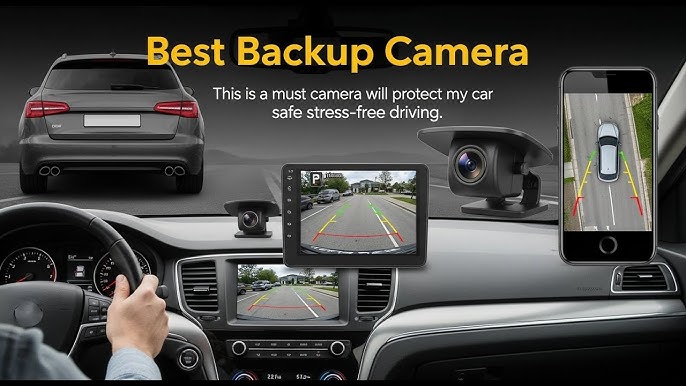
Have you ever found yourself struggling to reverse your car in tight spaces? Or maybe you’ve had a close call with a hidden object while backing up.
If so, you’re not alone. Many drivers face the challenge of limited visibility when reversing, which can lead to unnecessary stress and potential accidents. But what if there was a solution that could make parking and reversing easier and safer for you?
Imagine having an extra pair of eyes to guide you. That’s where a backup camera comes into play. You’ll discover how installing a backup camera in your car can transform your driving experience. We’ll explore the benefits, the installation process, and help you decide if it’s the right choice for you. So, if you’re ready to upgrade your driving confidence and ensure safety for you and your passengers, keep reading. You might just find the answer you’ve been looking for.
Benefits Of Backup Cameras
Installing a backup camera enhances safety by providing a clear view while reversing. It helps prevent accidents and improves parking precision. Most cars can be equipped with a backup camera, offering drivers peace of mind and increased awareness on the road.
Installing a backup camera in your car can greatly improve safety. These devices provide a clear view of the area behind your vehicle. This can prevent accidents and make parking easier. Backup cameras have become essential for modern drivers. Let’s explore their benefits.Enhanced Safety
Backup cameras help reduce blind spots. Drivers can see obstacles and pedestrians more easily. This helps in preventing collisions. It also ensures the safety of children and pets. Cameras act as an extra pair of eyes.Easy Parking
Parking can be challenging in tight spaces. Backup cameras offer a clear view of the parking spot. Drivers can maneuver their vehicles with precision. Parallel parking becomes less stressful. This feature saves time and effort.Increased Vehicle Value
A backup camera can increase your car’s resale value. It is a desirable feature for many buyers. Modern cars often come with built-in cameras. Adding one to an older car makes it more appealing.Accident Prevention
Accidents often happen while reversing. A backup camera provides real-time footage. This helps drivers react quickly to sudden obstacles. The risk of bumping into objects is reduced.Cost-effective Solution
Installing a backup camera is affordable. Many models are available to fit different budgets. The long-term safety benefits outweigh the initial cost. It is a smart investment for any driver.
Credit: www.youtube.com
Choosing The Right Backup Camera
Installing a backup camera in your car is possible and enhances driving safety. Many vehicles support aftermarket cameras, offering a range of features. Choose one that fits your budget and vehicle specifications for better parking and reversing assistance.
Choosing the right backup camera can enhance your driving experience significantly. A backup camera provides a clear view of what’s behind your car. It helps in reversing and parking safely. Selecting the best camera involves understanding different types and features.Types Of Backup Cameras
Backup cameras come in various types. Each type has unique advantages.- Wired Cameras:These connect directly to your car’s display. They offer reliable performance.
- Wireless Cameras:They use Bluetooth or Wi-Fi for connectivity. Installation is easier with fewer wires.
- License Plate Cameras:These attach to the license plate. They are discreet and easy to install.
- Dashboard Cameras:These mount on the dashboard. They provide a wide view of the rear.
Features To Consider
Choosing a camera involves checking important features. Each feature improves safety and usability.- Resolution:Higher resolution gives clearer images.
- Night Vision:Essential for driving in low-light conditions.
- Field of View:A wider field captures more area behind the car.
- Weatherproofing:Protects the camera from rain and dust.
- Grid Lines:Helps in judging distance while reversing.
Tools And Materials Needed
Gather essential tools and materials like a screwdriver, wiring kit, and backup camera kit. Ensure you have a drill and electrical tape for secure installation.
Installing a backup camera in your car can be a game-changer for safety and convenience. Imagine effortlessly reversing into tight spots or confidently backing out of your driveway, knowing you have a clear view of what’s behind you. But before you dive into the installation process, it’s crucial to gather the right tools and materials. Having everything you need at your fingertips can make the process smoother and much less frustrating.Tools Needed
To ensure a smooth installation, you’ll need a few essential tools. First, a drill with a set of drill bits is crucial for making precise holes. A screwdriver set will help you secure components and make adjustments. Wire strippers are indispensable for handling electrical connections safely. A multimeter comes in handy for testing voltage and ensuring connections are secure. Lastly, don’t forget safety gear like gloves and safety glasses to protect yourself during installation.
Materials Needed
Gathering the right materials is just as important as having the right tools. You’ll need a backup camera kit, which typically includes the camera itself, wiring, and mounting components. Look for a kit that matches your car’s make and model for the best fit. Electrical tape is essential for securing connections and preventing shorts. Zip ties can keep wires neatly organized and out of sight. A fuse tap will help you safely connect the camera to your car’s electrical system without overloading it.
Not all backup cameras are created equal. Consider factors like resolution, field of view, and night vision capabilities when choosing the right camera for your car. A high-resolution camera will provide clearer images, making it easier to spot obstacles. A wide field of view ensures you see more of what’s behind your car. Night vision capabilities are crucial for safety in low-light conditions. Make sure the camera you choose is compatible with your vehicle’s existing setup.
Testing Your Setup
Before finalizing the installation, it’s wise to test your setup. Connect the camera temporarily and check the display to ensure it shows the correct view. Adjust the camera angle if needed, so you have the best perspective. Use the multimeter to check electrical connections for stable voltage readings. Testing beforehand can save you from having to redo parts of the installation later. Are you getting the perfect view when you reverse?
With the right tools and materials, installing a backup camera can be a straightforward process. So, are you ready to enhance your driving experience with a backup camera?Preparing For Installation
Installing a backup camera in your car can significantly enhance your driving experience by offering better visibility and safety. Preparing for installation is a crucial step that can make or break the success of your DIY project. Let’s dive into how you can effectively get ready for this task, ensuring a seamless and successful installation process.
Selecting The Installation Location
Choosing the right location for your backup camera is essential. Consider mounting the camera on your license plate or near the rear bumper. These spots generally offer a wide field of view. However, be cautious of obstructions such as spare tires or trailer hitches that may block the view.
Ask yourself what angle provides the best coverage and minimizes blind spots. A misaligned camera can lead to poor visibility, defeating its purpose. Experiment with temporary placements before finalizing the spot.
Ensuring Vehicle Compatibility
Not all backup cameras are universally compatible with every vehicle. Check if your car’s existing system supports additional camera inputs. Some older models might require additional adapters or monitors.
Researching your vehicle’s specifications can save you time and money. Visit online forums or consult your car’s manual for insights. Knowing your car’s limitations can prevent installation headaches later.
Installing The Backup Camera
Installing a backup camera in your car is possible and enhances safety. With a few tools, you can easily set up the camera yourself. Follow the instructions carefully for a successful installation.
Installing a backup camera can enhance safety while reversing. It’s a simple process that improves your driving experience. Follow these steps to successfully install a backup camera in your car.Mounting The Camera
Choose a location for the camera. The rear bumper or license plate area works well. Ensure the camera has a clear view. Use screws or adhesive to secure the camera. Make sure it is stable and won’t move while driving.Connecting The Wiring
Locate the reverse light wires. These power the camera when backing up. Connect the camera’s power wire to the reverse light wire. Use connectors or electrical tape for a secure connection. Ensure the video cable reaches the display inside the car. Route the cable through the car’s interior.Testing The System
Turn on the car and shift to reverse gear. Check the camera view on the display screen. Adjust the camera angle if needed. Ensure the image is clear and the system functions well. Test multiple times to confirm reliability.Credit: dashcamtalk.com
Troubleshooting Common Issues
Installing a backup camera can improve your driving experience. But sometimes, issues may arise. Troubleshooting these common problems can save time and frustration. Understanding the root cause can help you fix them quickly.
Image Quality Problems
Poor image quality can be frustrating. Check if the camera lens is clean. Dirt and dust can blur the view. Clean it gently with a soft cloth.
Inspect the camera angle. Ensure it points correctly at the road. Adjust it to get a clear view.
Wiring issues can also affect image quality. Examine the connections for any loose wires. Secure them properly. This can often resolve the problem.
Camera Not Turning On
If the camera doesn’t turn on, check the power source first. Ensure the camera is connected to the car’s power supply.
Look at the fuse. A blown fuse might cause the camera to stop working. Replace it if necessary.
Inspect the wiring for any damage. Damaged wires can disrupt power flow. Repair or replace them to restore function.
Maintenance Tips
Installing a backup camera in your car enhances safety and convenience. To keep it working perfectly, regular maintenance is crucial. Here are some essential maintenance tips.
Check Camera Lens Regularly
Keep the camera lens clean for a clear view. Dirt and grime can block the lens. Use a soft cloth to wipe it gently.
Inspect Wiring Connections
Loose wires can disrupt the camera’s function. Check connections frequently to ensure they are secure and free from damage.
Test The Display Monitor
Verify that the display monitor works correctly. Look for any signs of flickering or delay. Address any issues promptly.
Protect Against Weather Conditions
Extreme weather can affect camera performance. Use protective covers if needed. This helps prevent moisture or debris from causing damage.
Update Software If Available
Some cameras may require software updates. Check the manufacturer’s website for updates. Follow instructions carefully for installation.

Credit: www.tiktok.com
Frequently Asked Questions
How Do I Install A Backup Camera?
Installing a backup camera involves mounting the camera, connecting it to a power source, and routing the video signal to a display. Typically, the camera is positioned near the license plate. Professional installation ensures optimal performance, but DIY kits are available for those comfortable with vehicle electronics.
Can Any Car Have A Backup Camera?
Yes, most vehicles can be fitted with a backup camera. Older models may require additional wiring or adapters. Backup cameras enhance safety by improving visibility. Consult your vehicle’s specifications for compatibility before purchasing a camera kit.
What Tools Are Needed For Installation?
Basic tools like screwdrivers, pliers, and wire strippers are essential for installation. Some installations may require a drill for mounting the camera. Having a multimeter can be helpful for testing connections. Ensure you have the necessary tools before starting the installation process.
How Much Does Installation Cost?
The cost of installation varies depending on the camera model and professional fees. DIY kits can cost between $50 to $200. Professional installation might add $100 to $300. Comparing costs and benefits can help decide between DIY and professional services.
Conclusion
Installing a backup camera in your car is a smart choice. It enhances safety for you and others. Most cars can support a backup camera. Kits are available and usually simple to install. They can fit many car models. You can enjoy better parking and reduced blind spots.
Costs vary based on features and quality. DIY installation is possible with basic tools. Or, seek professional help for a seamless setup. Research the best option for your car. Enjoy the added peace of mind on the road.