

Have you ever watched a dash cam video and wondered just how fast a car was going? Whether you’re involved in a legal matter, a curious enthusiast, or simply want to ensure your safety on the road, understanding how to determine car speed from dash cam footage can be incredibly useful.
Imagine being able to dissect every frame and uncover the truth hidden within the pixels. This skill can empower you with insights that were once reserved for professionals. You don’t need to be a tech wizard or have specialized equipment; you just need the right approach and tools.
Read on to discover simple, effective methods that will transform the way you view your dash cam recordings. With the knowledge you’ll gain, you’ll feel more confident in analyzing videos, making informed decisions, and perhaps even preventing future mishaps. Dive into the article to unlock the secrets of car speed determination and become the detective of your own road adventures.
Basics Of Dash Cam Video
Dash cam videos capture everything happening on the road. They serve as a valuable tool for determining car speed. Understanding the basics of dash cam video helps in analyzing footage effectively. Knowing how to interpret video data is crucial for speed calculation. Let’s explore the fundamentals of dash cam video.
Types Of Dash Cams
Dash cams come in various types. Each has unique features. Some are basic, while others offer advanced options.
- Single Channel:Records the road in front.
- Dual Channel:Captures both front and rear views.
- 360-degree:Provides a panoramic view.
Choose one based on your needs. More cameras offer better coverage. This helps in accurate speed analysis.
Video Quality And Frame Rate
Video quality affects the clarity of the footage. High-definition videos are clearer. They make speed calculation easier.
- Resolution:720p is basic. 1080p or 4K is better.
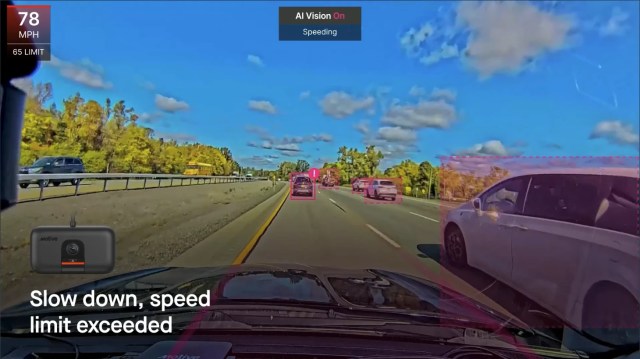
- Frame Rate:Measured in frames per second (fps).
Higher frame rates capture more details. Look for at least 30 fps. This ensures smoother video playback. Easier analysis of car speed.
Credit: gomotive.com
Essential Tools And Software
Determining car speed from dash cam video requires specific tools and software. These tools help analyze footage accurately and calculate speed effectively. Below, we explore the essential software and apps needed for this task.
Video Analysis Software
Video analysis software is crucial for examining dash cam footage. It allows you to slow down videos for detailed study. Software like Kinovea provides tools to track movement frame by frame. These tools help in understanding the speed and direction of the vehicle.
Other software options offer features like zoom and image stabilization. These features ensure clear visibility of the vehicle’s movement. The software can also highlight specific sections of the video for better analysis.
Speed Calculation Apps
Speed calculation apps convert video data into speed readings. Apps like RaceLogic use GPS data from videos to calculate speed. They can provide instant speed details with high accuracy.
Some apps allow you to input frame rates and distances manually. This feature ensures precise speed calculations. The apps often include user-friendly interfaces for easy navigation.
Extracting Key Data
Analyzing dash cam footage can reveal a car’s speed. Start by identifying reference points in the video. Measure the time taken to pass these points, then calculate speed using distance over time.
Extracting key data from dash cam video is essential for determining car speed. This process requires careful examination of the video footage to gather accurate information. The main focus is on identifying specific elements in the video that can be used to calculate speed. By breaking down the video frame-by-frame and pinpointing reference points, you can derive important data needed for precise speed calculations.Frame-by-frame Analysis
Analyzing dash cam video frame-by-frame helps capture detailed information. Each frame offers a snapshot of the car’s position and movement. To begin, pause the video at intervals and note the position of the car. This method allows you to track the car’s progress over time. Look for changes in position and distance covered between frames. This data is crucial for calculating speed accurately.Identifying Reference Points
Reference points in the video are key for measuring speed. These points might include road markings, signposts, or buildings. Select fixed objects visible in multiple frames. Use these to gauge how far the car travels between frames. Reference points help establish a consistent measure for calculating speed. Ensure the selected points are clearly visible throughout the video. They should remain unchanged in position and size. This ensures reliability in the speed calculation process.
Credit: www.youtube.com
Calculating Speed
Analyzing dash cam footage can reveal car speed. Use video timestamps to measure distance traveled between frames. Calculate speed by dividing distance by time. This method is practical for understanding vehicle speed in various driving situations.
Calculating the speed of a car using dash cam footage can seem like a complex task, but with the right approach, it becomes manageable. The key lies in understanding how to use the data captured by your dash cam effectively. By focusing on the essentials—distance, time, and frame rate—you can accurately determine the vehicle’s speed. Let’s dive into some practical ways to achieve this.Using Distance And Time
One of the simplest methods to calculate speed is by using the fundamental formula: Speed = Distance / Time. Start by identifying two distinct points in your video footage. These could be road markers or any identifiable landmarks. Measure the distance between these two points in meters or feet. If you’re unsure, tools like Google Maps can provide accurate measurements. Next, determine the time it takes for the vehicle to travel between these points. This can be done by noting the time stamps on the video when the car passes each point. Finally, plug these values into the formula. Remember, if you measure distance in meters and time in seconds, the speed will be in meters per second. Convert it to your preferred unit if needed.Applying Frame Rate In Calculations
The frame rate of your dash cam can be a powerful tool in calculating speed. Dash cams typically record at a specific number of frames per second (fps). This means you can determine the time interval between frames. For instance, a dash cam recording at 30 fps means each frame represents approximately 0.033 seconds. By counting the number of frames it takes for the car to travel a known distance, you can calculate the time taken. Use this time along with the measured distance to calculate the speed using the same formula: Speed = Distance / Time. This method can be especially useful in scenarios where the time stamps might not be clear or if you need more precise measurements. Isn’t it fascinating how a simple recording device can provide such detailed information? With a little patience and attention to detail, you can transform your dash cam into a powerful tool for understanding vehicle dynamics. Armed with these techniques, you can confidently analyze dash cam footage and unlock the insights hidden within.Accuracy And Common Errors
Analyzing dash cam footage can reveal car speed by calculating the time taken between two points. Misjudgments occur due to video quality or inconsistent frame rates, impacting accuracy.
Determining car speed from dash cam video can be a fascinating exercise, but it demands precision. Ensuring accuracy while avoiding common errors can be tricky. Often, even a small oversight can lead to significant inaccuracies in speed estimation. Let’s explore how to enhance accuracy and identify common pitfalls in this process.Factors Affecting Accuracy
Several factors can influence the accuracy of speed determination from dash cam footage. – Frame Rate: The number of frames per second (fps) your dash cam records can impact calculations. A higher frame rate generally provides more precise data points. – Camera Angle: The angle at which the camera is mounted affects perspective and distance measurement. A straight-on view of the road is usually preferable. – Resolution: Better resolution provides clearer images for analysis, reducing guesswork in identifying reference points. Imagine you’re trying to measure distance on a bumpy road; the camera’s shake can distort the perceived motion. A stable mount is essential for reliable data.Avoiding Measurement Mistakes
While measuring speed, several common mistakes can lead to errors. – Ignoring Calibration: Ensure your dash cam is properly calibrated. Misalignment can skew the perceived speed. – Overlooking Reference Points: Reliable reference points are crucial for accurate calculations. Use fixed objects like road signs or lane markers. – Assuming Constant Speed: Vehicles rarely travel at a constant speed. Consider variations due to acceleration or braking during your analysis. A friend once shared how they miscalculated speed due to a misplaced decimal point in their calculations. Double-checking your work can prevent such errors. Ask yourself: Are you considering all variables that might affect your speed measurement? By addressing these factors and avoiding common mistakes, you can achieve a more accurate speed determination from your dash cam footage.
Credit: kustomsignals.com
Legal And Ethical Considerations
Understanding the legal and ethical boundaries is crucial when analyzing dash cam footage for car speed. Ensure compliance with privacy laws and seek consent before using video evidence, respecting individual rights and maintaining integrity.
Determining car speed from dash cam video may seem straightforward, but it comes with a web of legal and ethical considerations. Before diving into technical methods, it’s crucial to understand the implications of using such footage. From privacy concerns to potential use in legal proceedings, navigating this terrain requires careful thought.Privacy Concerns
When using dash cam footage, you must consider the privacy of those captured in the video. Dash cams can record pedestrians, other drivers, and even private property. Ask yourself: Is it necessary to share this footage, and have I obtained consent where needed? Recording in public spaces is generally permissible, but sharing footage publicly or on social media can lead to legal issues. Always blur faces and license plates to protect identities. Respecting privacy isn’t just ethical—it’s often a legal requirement.Use In Legal Proceedings
Dash cam footage can be invaluable in court, but there are rules around its admissibility. You may wonder if your video will hold up as evidence. The answer depends on the jurisdiction and how the footage was obtained. Ensure the recording is clear, unedited, and time-stamped. This can help prove its authenticity. Be prepared to provide the original file, as courts may not accept copies or altered versions. Understanding these legal and ethical aspects not only protects you but also ensures the footage can be used effectively if needed. Have you considered how these factors impact your dash cam usage? Taking the time to ponder these considerations can save you from potential pitfalls.Expert Tips For Reliable Results
Analyzing dash cam footage can reveal a car’s speed. Use timestamps and distance markers for accurate calculations. Consider software tools to assist in measuring speeds effectively.
Determining car speed from dash cam video might sound like a task reserved for tech experts. But with the right tips, you can do it with precision and confidence. Whether you’re trying to settle a dispute or simply curious about your driving habits, these expert tips will ensure reliable results every time. Dive into the specifics and arm yourself with the right techniques.Ensuring Video Clarity
Clarity is crucial when analyzing dash cam footage. Make sure your camera is set to a high resolution. A clearer image makes it easier to identify landmarks and calculate distances. Check the lighting conditions; avoid glare and shadows that can obscure details. Keep your lens clean. A smudge or dirt can distort the view, leading to inaccurate speed calculations. Regularly inspect the dash cam’s positioning to ensure it captures the road ahead without obstructions.Cross-verification With Gps Data
GPS data can be a reliable ally. If your dash cam supports GPS logging, use this feature to cross-verify speed estimates. GPS data provides a second layer of confirmation, reducing the chances of errors. Consider using a smartphone app to track your GPS speed simultaneously. This provides a backup source of data, helping to confirm the dash cam’s accuracy. Have you ever thought about discrepancies between video speed calculations and GPS data? If you notice inconsistencies, double-check the timestamps and synchronization between devices to ensure they align perfectly.Frequently Asked Questions
How Can I Calculate Car Speed From Dash Cam Video?
To calculate car speed from dash cam video, use the frame rate and distance traveled. Measure the distance between two points in the video. Then, calculate the time taken between frames. Divide the distance by time to find speed. Ensure accuracy by considering frame rate and calibration.
What Tools Are Needed For Speed Calculation?
For speed calculation, you’ll need a dash cam video, a ruler or measuring app, and basic math skills. Optional tools include video editing software for frame analysis and specialized apps designed for speed calculation. These tools help ensure accurate measurements and calculations.
Is It Legal To Use Dash Cam Video For Speed?
Using dash cam video for speed calculation is generally legal, but laws vary. Always check local regulations before using footage for legal purposes. Dash cam videos can serve as evidence in disputes, but their admissibility in court depends on jurisdiction and circumstances.
Can Dash Cam Speed Data Be Used In Court?
Dash cam speed data can be used in court, depending on jurisdiction. Ensure the video is clear and timestamps are accurate. Courts may require additional evidence for validation. Always consult with legal experts to understand the admissibility and relevance of dash cam footage in legal proceedings.
Conclusion
Determining car speed from dash cam videos is straightforward. With clear steps, anyone can do it. First, ensure your camera captures quality footage. Next, use tools like video editing software for measurements. Remember, accuracy matters. Double-check your results for precision.
Practice makes perfect. Repeat the process to gain confidence. These skills improve your road safety awareness. Now, you’re ready to analyze dash cam footage effectively. Keep learning and stay informed. Understanding car speed can prevent accidents. Use this knowledge wisely on the road.
Stay safe and drive responsibly.