
Imagine pulling out of a tight parking spot with confidence, knowing you can see everything behind you. That’s the magic of a car backup camera.
These handy devices make reversing safer and easier, but many drivers don’t use them to their full potential. Are you one of them? Or maybe you’re considering getting one but aren’t sure how to use it effectively? You’re in the right place.
This guide will show you how to master your backup camera, making your driving experience smoother and safer. Keep reading to learn the tips and tricks that will turn you into a pro at using this essential tool. Your peace of mind is just a few scrolls away!
Credit: www.carputech.com
Benefits Of Car Backup Cameras
Car backup cameras provide enhanced safety by offering a clear view behind the vehicle. They help prevent accidents during parking and reversing. Drivers can easily navigate tight spots and avoid obstacles with real-time visual guidance.
Car backup cameras have become an essential part of modern driving, providing numerous advantages that enhance safety and convenience. These devices offer more than just a view of what’s behind your vehicle; they transform the way you navigate and manage your surroundings. Whether you’re a new driver or a seasoned one, understanding the benefits of backup cameras can significantly impact your driving experience.Increased Rear Visibility
Backup cameras provide a clear, wide-angle view of the area directly behind your vehicle. This increased visibility is invaluable when reversing, especially in tight spots or crowded areas. Imagine having a second pair of eyes that can spot obstacles you might miss by just using your mirrors.Accident Prevention
With the enhanced rear view, backup cameras help in preventing accidents. They alert you to children, pets, or low-lying objects that might be in your blind spot. Have you ever had that heart-stopping moment when you almost hit something you didn’t see? Backup cameras aim to eliminate those close calls, giving you peace of mind while reversing.Ease Of Parking
Parking can be a daunting task, but backup cameras make it much easier. They provide guidelines that help you judge distances and angles accurately. Whether you’re parallel parking on a busy street or backing into your driveway, the camera helps you park like a pro. Have you ever squeezed into a spot and been unsure of how much room you have? With a backup camera, that guesswork becomes a thing of the past. By enhancing your awareness and providing critical visual information, backup cameras offer practical benefits that can make every drive safer and more enjoyable. As you consider the role of technology in your vehicle, ask yourself: can you afford to drive without this added layer of safety and convenience?
Credit: www.youtube.com
Types Of Backup Cameras
Choosing the right backup camera can significantly enhance your driving experience, making reversing a much safer and easier task. With various types available, it’s important to understand what each offers to find the best fit for your vehicle and needs. Let’s explore the types of backup cameras that can make a difference in your daily drive.
Wired Cameras
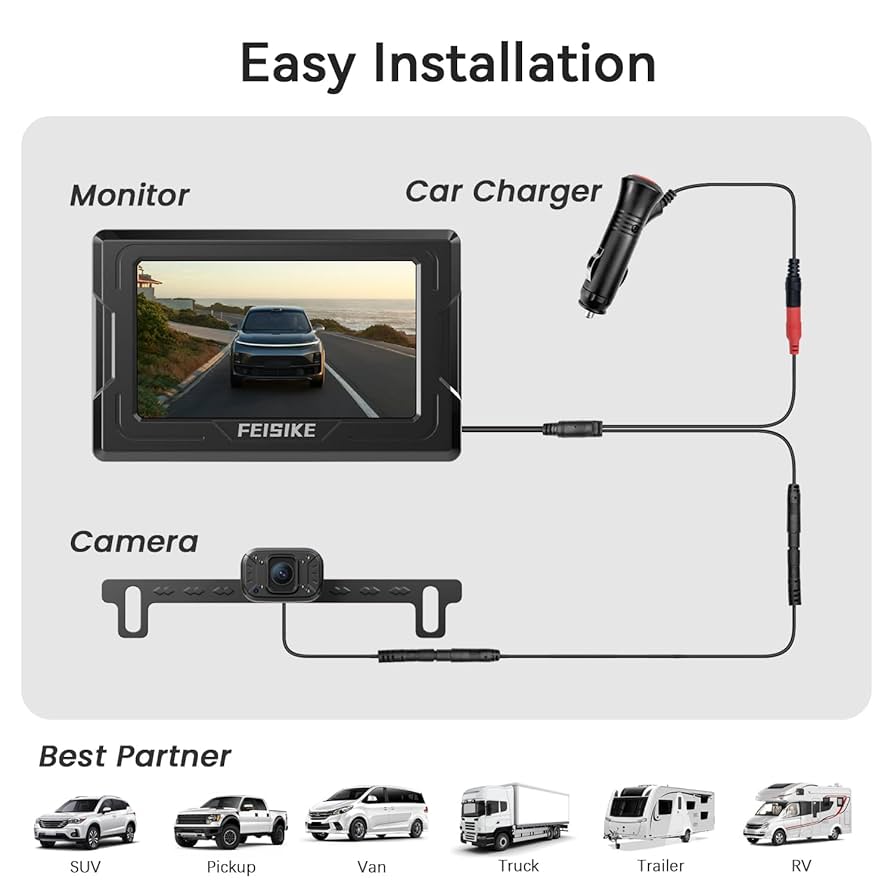
Wired cameras offer a stable and reliable connection between the camera and the monitor. They are less prone to interference compared to wireless options. The installation might require professional help as it involves running cables through your vehicle’s bodywork.
If you’re someone who prefers a no-fuss, consistent performance, wired cameras are a great choice. They provide a clear and uninterrupted view, which is crucial when navigating tight spaces.
Wireless Cameras
Wireless cameras eliminate the need for extensive wiring, making them easier to install. They connect to the monitor using radio frequencies, offering flexibility in camera placement. However, signal interference can sometimes be a challenge, affecting image quality.
Consider wireless options if you enjoy DIY projects and want to avoid the hassle of running cables. They offer convenience, especially if your vehicle has limited space for wired installation.
License Plate Cameras
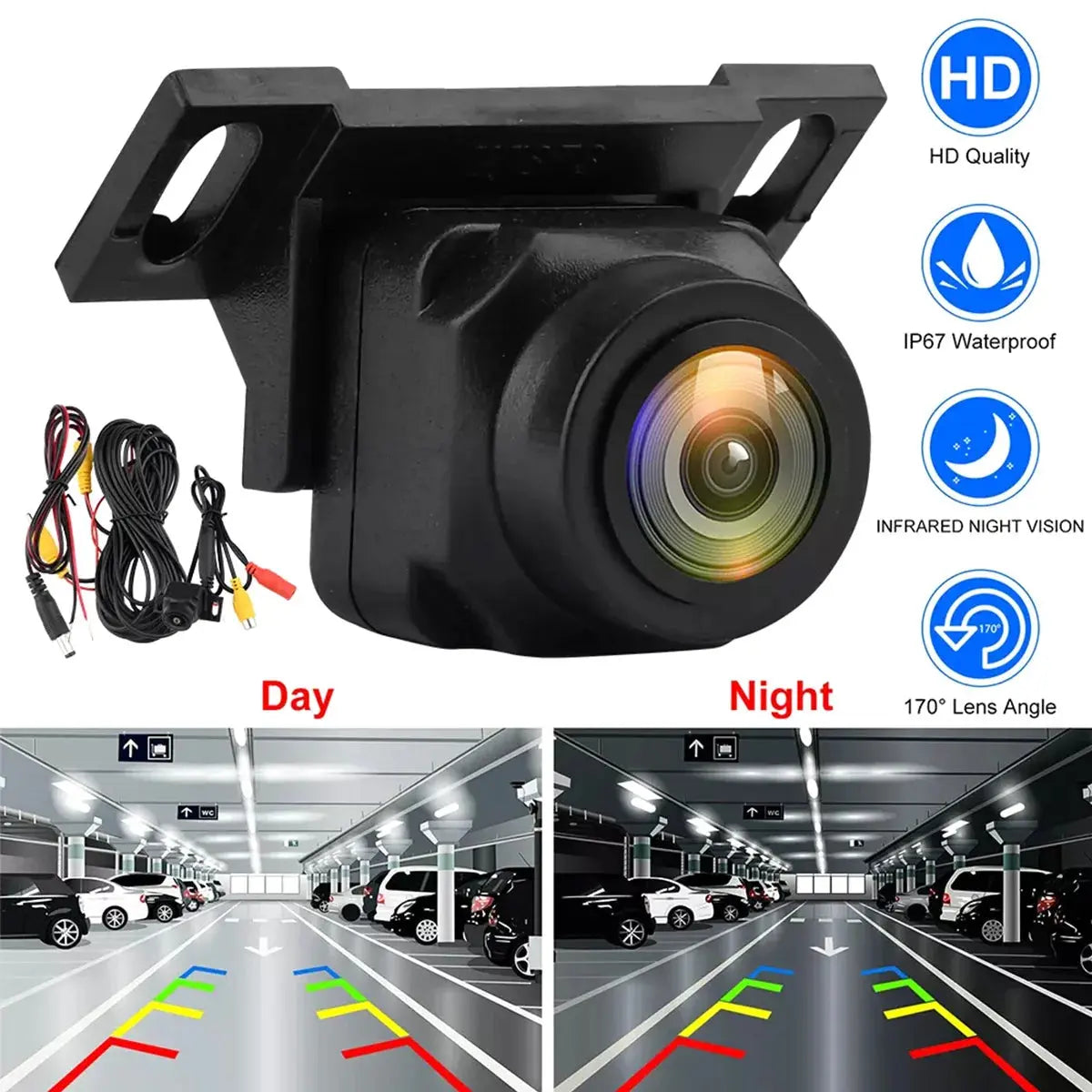
License plate cameras are designed to be discreetly installed on or around your vehicle’s license plate. Their compact design makes them ideal for those seeking a subtle addition to their car’s exterior. Installation is straightforward, often requiring minimal tools.
This type of camera is perfect for anyone looking for an unobtrusive solution that integrates seamlessly with the vehicle’s aesthetics. They provide a good balance of functionality and style.
Choosing a backup camera involves weighing the pros and cons of each type. Which one aligns with your lifestyle and vehicle setup? Consider your preferences and the installation process to make an informed decision. Safety doesn’t have to be complicated, and the right camera can transform your driving confidence.
Installation Process
Installing a car backup camera might seem daunting, but with the right guidance, it can be a rewarding DIY task. Whether you’re enhancing your vehicle’s safety features or simply upgrading for convenience, understanding the installation process is crucial. In this section, we’ll walk you through everything you need to know to get your backup camera up and running.
Tools Required
- Screwdrivers (Phillips and flat-head)
- Wire strippers and crimpers
- Electrical tape
- Drill with bits
- Multimeter
- Cable ties
Before you dive into the installation, gather all necessary tools. Having these tools on hand will streamline the process and prevent unnecessary trips to the hardware store.
Step-by-step Guide
- Find a suitable mounting location:Choose a spot near your license plate or on the rear bumper. Ensure it provides a clear view and can be secured firmly.
- Drill holes for mounting:Carefully drill holes at the marked location. Use caution to avoid damaging the vehicle’s body or paint.
- Run the camera’s wiring:Route the wires through the vehicle’s body, ideally following existing wiring paths. This keeps everything neat and reduces the risk of snagging.
- Connect to the power source:Use the multimeter to locate the reverse light wire. Connect the camera’s power wire to this, ensuring the camera activates only when reversing.
- Secure the camera:Mount the camera using screws, ensuring it’s tightly fitted to avoid vibrations while driving.
- Test the camera:Once installed, test the camera to ensure it powers on correctly and provides a clear image.
Following these steps allows you to install your camera efficiently, transforming your driving experience with enhanced safety.
Professional Installation Options
If DIY isn’t your style or you’re short on time, consider professional installation. Many automotive shops offer this service, ensuring precision and reliability. Prices vary, but you gain peace of mind knowing experts handle the setup.
Think about what matters most: convenience, cost, or learning a new skill. Would you prefer the satisfaction of DIY, or do you value professional expertise? The choice is yours, but either way, you’ll benefit from a safer driving experience.
Operating The Backup Camera
Operating a backup camera involves shifting to reverse gear and observing the screen for obstacles. Adjust the viewing angle for clarity and use guiding lines to navigate safely. Regular practice enhances familiarity and confidence in using this feature.
Operating a car backup camera can seem daunting at first, but with a little practice, it becomes second nature. These cameras are designed to make parking and reversing safer, and understanding how to operate them effectively is key to maximizing their benefits. Whether you’re a seasoned driver or new to the road, learning to use your backup camera can significantly enhance your driving experience.Activating The Camera
To activate your backup camera, you’ll typically need to shift your car into reverse. This action automatically triggers the camera, displaying the rear view on your dashboard screen. If your camera isn’t activating, check your vehicle’s manual for specific instructions, as some models may require additional steps. Remember, the camera is a tool to assist you, so ensure your mirrors are also properly adjusted for a complete view.Adjusting Camera Settings
Most modern backup cameras allow you to adjust settings to suit your preferences. Look for options to change brightness, contrast, and guidelines on the display. These adjustments can enhance visibility, especially during different lighting conditions. Try experimenting with the settings to find what works best for you. This can make a significant difference in clarity and ease of use.Interpreting The Display
Understanding the display is crucial for making the most out of your backup camera. Pay attention to the guidelines that indicate your car’s trajectory. These lines help you judge distances and angles accurately while reversing. However, it’s essential to remember that objects in the camera may appear closer than they are. Always double-check your surroundings before making a move. Backup cameras are a fantastic aid, but they don’t replace the need for vigilance while driving. Have you ever found the camera giving a different perspective than your mirrors? Share your experiences and insights on how you navigate using this technology.Maintenance Tips
Ensure the camera lens is clean for a clear view. Check the connection regularly to avoid signal issues. Adjust the camera angle to cover blind spots effectively.
Maintaining your car’s backup camera ensures it functions properly and provides clear, reliable visuals whenever you’re reversing. While these cameras are a fantastic aid, they require regular care to continue operating at their best. Let’s dive into some essential maintenance tips that can keep your backup camera in top shape.Cleaning The Camera Lens
The camera lens is your window to the rear view, and a dirty lens can obscure that view. Regularly clean the lens with a soft microfiber cloth to remove dirt, grime, and water spots. Avoid using abrasive materials or harsh chemicals, as they can scratch the lens and damage the coating. Consider using a lens cleaner designed for electronics, which can help maintain the lens’s clarity. You might be surprised at how much clearer your camera feed becomes with regular cleaning. After all, a clean lens can be the difference between spotting an obstacle and having a fender bender.Checking For Wiring Issues
Wiring issues can lead to intermittent signal loss or complete failure of your backup camera. Inspect the wiring for any visible damage or wear, especially if you notice flickering images or no image at all. Ensure connections are secure and free of corrosion. If you’re not confident in your ability to check the wiring, consider consulting a professional. It’s always better to address small issues before they become major repairs.Software Updates
Just like your smartphone, your backup camera system may have software that needs updating. Check if your car manufacturer offers updates that can enhance the camera’s functionality or fix bugs. Installing updates can improve image quality and add new features. Keep an eye on your car’s dashboard notifications or visit the manufacturer’s website for the latest updates. Staying updated ensures you’re getting the most out of your backup camera technology. By taking care of these maintenance tasks, you ensure your car backup camera remains a reliable part of your driving experience. What other maintenance tips have you found helpful for your backup camera?
Credit: pyleusa.com
Troubleshooting Common Issues
Experiencing blurry images or screen flickers on your backup camera? Check for loose connections or dirt on the lens. Adjust settings if the image appears reversed or too dark.
When using a car backup camera, problems can arise. These issues can affect your safety and convenience. Understanding common problems helps in resolving them quickly. This section will guide you through troubleshooting techniques for common issues.Image Distortion
Image distortion can create challenges while reversing. The camera may display warped images. Check the camera lens first. Dirt or water can cause distortion. Clean the lens using a soft cloth. If distortion persists, examine the camera’s position. Ensure it is not tilted. Adjust the camera angle if needed. Still experiencing issues? Inspect the wiring for any damage. Damaged wires can lead to image problems. Replace any faulty wires to restore image clarity.Signal Interference
Signal interference can disrupt the camera feed. This often occurs with wireless systems. Nearby devices may cause interference. Check for electronic devices near the camera. Remove or relocate these devices. Examine the camera’s frequency settings. Ensure they do not conflict with other electronics. If interference continues, check the antenna connections. Ensure they are secure. Loose connections can weaken the signal. Tighten any loose connections for better performance.Camera Malfunctions
Camera malfunctions can be frustrating. Sometimes, the camera may not turn on. Check the power source first. Ensure the camera receives power. Inspect the fuse box for blown fuses. Replace any damaged fuses. If the camera still fails, check the wiring. Look for any loose or damaged wires. Secure or replace these as necessary. Persistent issues might require professional assistance. Seek help to ensure your camera functions properly.Safety Practices With Backup Cameras
Backup cameras enhance vehicle safety, but proper use is essential. Understanding safety practices ensures effective use and prevents accidents. Let’s explore some vital aspects of using backup cameras safely.
Avoiding Over-reliance
Backup cameras provide a clear view behind the vehicle. Yet, relying solely on them can be risky. Cameras may not capture everything. Weather can affect visibility, and camera lenses can get dirty. Always remain cautious and use your judgment.
Combining With Mirrors And Sensors
Mirrors and sensors complement backup cameras well. Check side mirrors regularly to spot nearby objects. Sensors alert you to obstacles outside the camera’s view. Using all tools together enhances safety and awareness.
Awareness Of Blind Spots
Backup cameras reduce blind spots but don’t eliminate them. Large vehicles and narrow spaces can hide objects. Always look over your shoulders before reversing. Stay aware of potential blind spots around your vehicle. This ensures you won’t miss anything important.
Frequently Asked Questions
How Does A Car Backup Camera Work?
A car backup camera uses a wide-angle lens to capture the rear view. It transmits the video feed to a monitor inside your vehicle. This helps drivers see obstacles and blind spots while reversing. It enhances safety and prevents accidents by providing a clear rear view.
Can You Install A Backup Camera Yourself?
Yes, you can install a backup camera yourself. Many systems come with detailed instructions and all necessary components. Basic tools and some patience are required. However, professional installation ensures optimal performance and integration with existing systems. Choose based on your confidence and technical skills.
Do Backup Cameras Work At Night?
Yes, most modern backup cameras work at night. They are equipped with infrared or night vision technology to provide clear images in low light. This ensures safety and visibility even in darkness. It is important to check specifications to confirm night vision capability before purchasing.
Are Wireless Backup Cameras Reliable?
Yes, wireless backup cameras are generally reliable. They offer easy installation without complex wiring. However, signal interference can occasionally affect performance. Choosing a high-quality model with strong signal transmission minimizes issues. Regular maintenance and checking connections ensure consistent performance.
Conclusion
Mastering the use of a backup camera enhances your driving safety. It minimizes blind spots and helps avoid obstacles. Always check your mirrors, too. Combine both for best results. Practice makes perfect. Get familiar with your camera’s view. Adjust settings to suit your preference.
Stay focused and alert while reversing. Don’t rely solely on technology. Use your instincts as well. Backup cameras are tools, not replacements for caution. With practice, you’ll feel more confident. Safe driving is always the priority. Happy reversing with newfound ease and assurance!