
Have you ever found yourself straining to see behind your car while reversing? You’re not alone.
Many drivers wish for an extra set of eyes when backing up, especially in crowded parking lots or tight spaces. Imagine the peace of mind knowing you can spot obstacles effortlessly. Adding a backup camera could be the perfect solution to enhance your driving experience and safety.
But can you really add one to your car, and if so, how? This guide will walk you through everything you need to know about installing a backup camera, even if your vehicle didn’t come equipped with one. Ready to transform your driving experience? Let’s dive in!
Credit: jerry.ai
Benefits Of Adding A Backup Camera
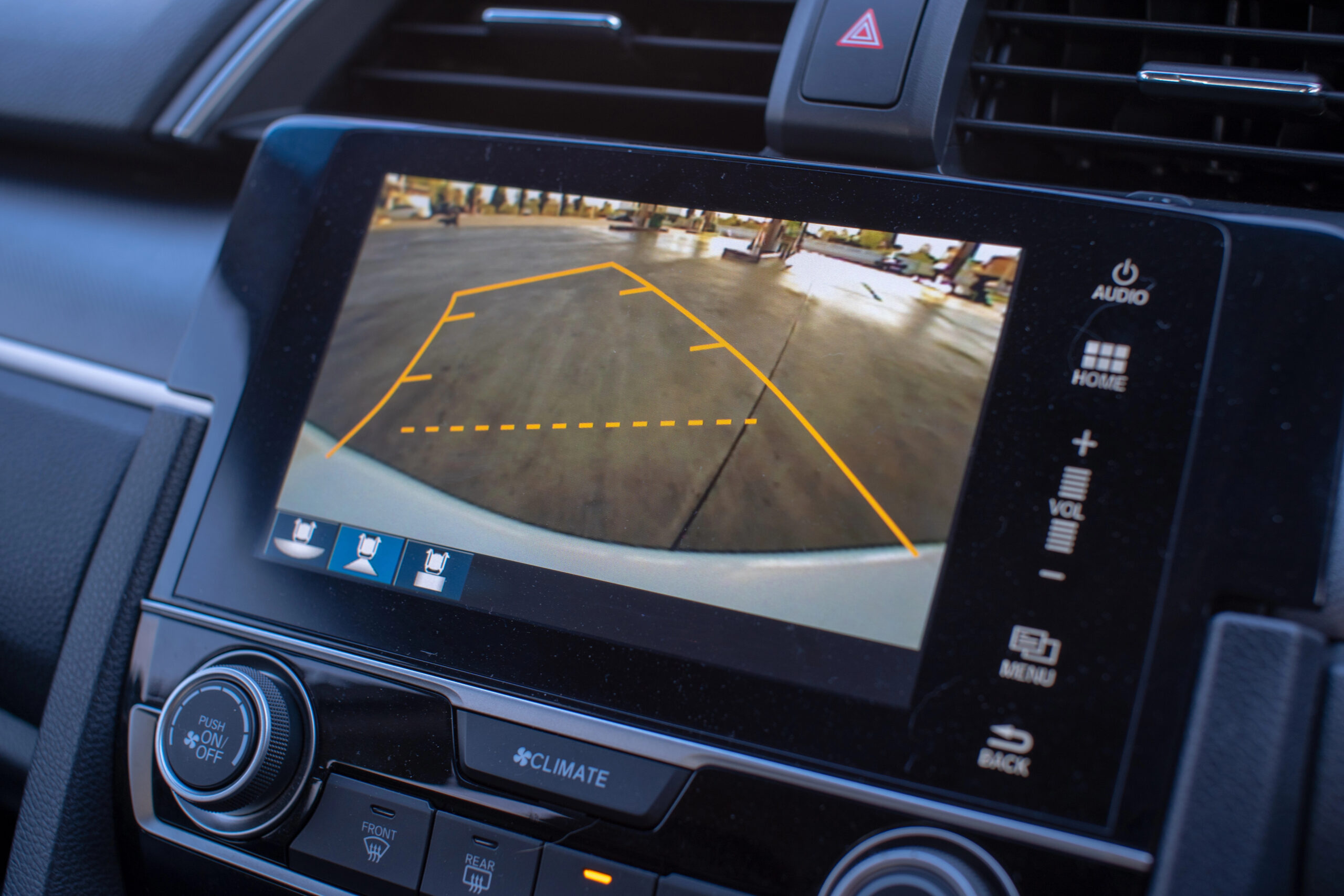
Adding a backup camera to a car enhances safety by providing a clear view behind the vehicle. It helps in avoiding obstacles, reducing the risk of accidents. Easy installation and increased convenience make it a valuable addition for any driver.
Adding a backup camera to your car can be a game-changer, especially if you’ve ever struggled with tight parking spaces or reversing in busy areas. It provides a clear view of the rear, helping you avoid obstacles and ensuring a safer driving experience. With technology advancing rapidly, it’s no longer a luxury but a practical addition that enhances your vehicle’s functionality.Enhanced Safety
Installing a backup camera significantly boosts the safety of your car. It reduces the risk of accidents by giving you a clear view of what’s behind your vehicle. Imagine backing out of your driveway without worrying about hitting a child’s bike or a hidden object. Wouldn’t that peace of mind be worth it?Improved Parking
Parking in cramped spaces can be stressful and challenging. A backup camera can make parallel parking a breeze. You can maneuver your car with precision, minimizing the chances of scrapes and dents. Have you ever parked perfectly on the first attempt? With a camera, it might become your new norm.Cost-effective Investment
While adding a backup camera requires an initial investment, it can save you money in the long run. Avoiding minor fender benders or larger accidents can prevent costly repairs. Plus, many insurance companies offer discounts for vehicles with safety features like these. Have you checked if your insurer provides such benefits?Increased Resale Value
Adding a backup camera can increase your car’s resale value. Buyers appreciate vehicles equipped with modern safety features. It can make your car more appealing in a competitive market. Think about the added edge you could have when it’s time to sell your car.Ease Of Installation
You might think installing a backup camera is complicated, but many systems are user-friendly. Some can be installed in a few hours with basic tools. There are options for DIY enthusiasts and professional installations. Have you considered how easy it can be to upgrade your car’s safety features on your own?
Credit: www.youtube.com
Types Of Backup Cameras
Adding a backup camera to a car is possible and enhances safety. Various types exist, including wireless cameras, wired cameras, and mirror-integrated cameras. Each type offers unique installation benefits and features suitable for different vehicle models.
Backup cameras can be a great addition to any car. They enhance safety and make parking easier. Choosing the right type of backup camera is key. Different types offer various features and installation options. Below, explore the main types of backup cameras available.Wired Backup Cameras
Wired backup cameras connect directly to the car’s system. They provide a stable and reliable video feed. Installation may involve running wires through the vehicle. These cameras offer clear images without interference. Ideal for those who prioritize reliability.Wireless Backup Cameras
Wireless backup cameras transmit video signals without wires. They use radio frequencies for communication. Easier to install, they require less drilling and wiring. They are great for quick setups. The image quality can vary depending on signal strength.License Plate Cameras
License plate cameras are mounted on the car’s license plate. They are discreet and blend well with the vehicle. These cameras are easy to install and remove. They often come with wide-angle lenses. Perfect for those who want a low-profile option.Built-in Display Options
Built-in display options integrate with the car’s existing screen. Some cameras come with their own screens. Others connect to the dashboard or rearview mirror display. This allows for seamless viewing. Ideal for modern vehicles with screen capability.Choosing The Right Camera For Your Car
Adding a backup camera to a car enhances safety and convenience. Many vehicles support aftermarket cameras, making installation straightforward. Ensure compatibility with your car’s system for optimal performance.
Choosing the right camera for your car requires thoughtful consideration. Backup cameras enhance safety and convenience. But not every camera fits every vehicle. Finding the perfect match involves several factors. These include compatibility, features, and budget.Assessing Compatibility
Compatibility is key. Not all cameras suit every car model. Check the camera’s connection type. Some need wired setups, others are wireless. Inspect your car’s dashboard space. This ensures proper installation. Also, verify the power source requirements. This prevents electrical issues.Evaluating Features
Features vary across different cameras. Look for night vision capabilities. This helps in low-light conditions. Wide-angle lenses offer broader views. Parking grid lines assist in parking. Some cameras have waterproof designs. This is crucial for durability. Review resolution quality. Clear images make driving safer.Considering Budget Constraints
Budget matters when buying a camera. High-end models offer advanced features. But affordable options exist too. Set a budget before shopping. This narrows your choices. Compare prices from various sellers. Discounts and sales can save money. Ensure the camera meets your needs despite the price.Installation Process
Adding a backup camera to your car enhances safety. The installation process involves mounting the camera, running wires, and connecting to the display. Ensure compatibility with your vehicle’s electrical system for seamless integration.
Installing a backup camera in your car can enhance safety. It helps drivers with better visibility while reversing. The installation process is straightforward if you follow each step carefully. With the right tools and guidance, you can complete this task efficiently.Tools And Equipment Needed
To start, gather the essential tools and equipment. You will need:- Screwdrivers: Both flathead and Phillips
- Wire cutters and strippers
- Electrical tape
- Drill with bits
- Multimeter for testing connections
- Backup camera kit
- Zipties for securing wires
Step-by-step Installation Guide
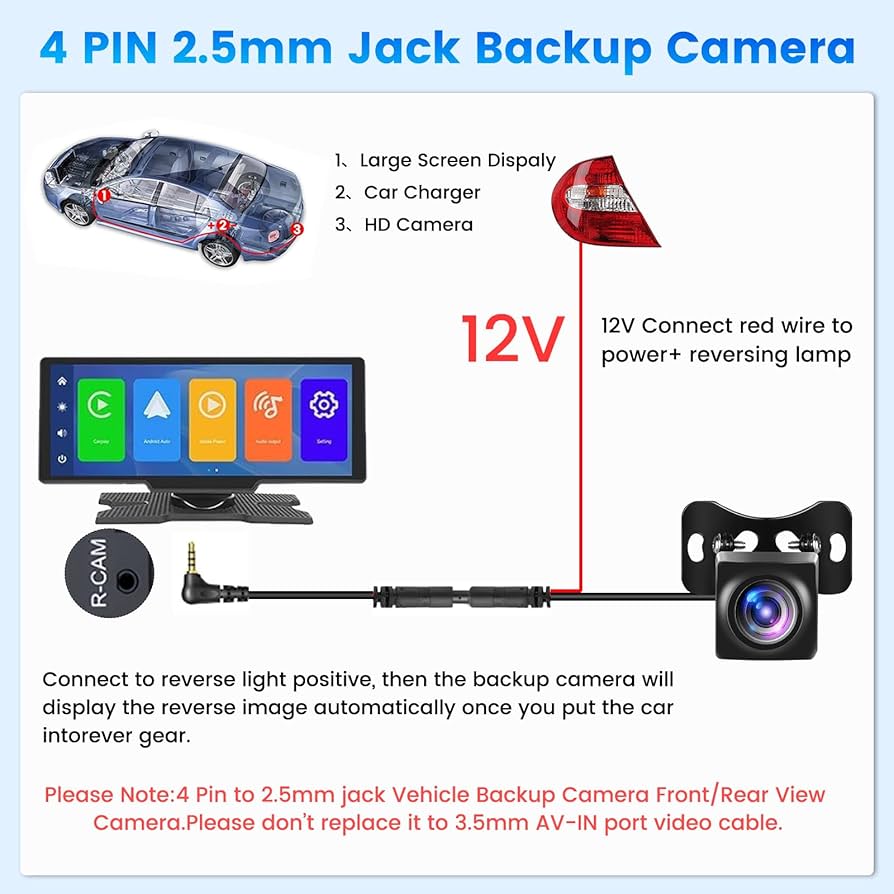
Begin by reading the backup camera manual. This helps understand the specific model requirements. Then, follow these steps: 1. Mount the Camera: Choose a spot near the license plate. Use a drill to make necessary holes. 2. Run the Wiring: Connect the camera wire through the vehicle’s trunk. Secure the wire with zipties. 3. Connect Power Supply: Locate the reverse light wires. Use the multimeter to ensure correct wires. Connect the camera’s power wire to these. 4. Install the Monitor: Place the monitor inside the car, often on the dashboard. Plug it into the car’s power outlet or fuse box. 5. Test the Camera: Turn on the car and shift to reverse. Check if the camera displays properly.Common Installation Challenges
Some challenges may arise during installation. Common issues include:- Incorrect wiring connections causing power issues.
- Limited space for running wires.
- Difficulty mounting the camera securely.
- Poor video quality due to improper connections.
Professional Installation Vs Diy
Adding a backup camera enhances safety while parking. Professional installation guarantees reliable setup but costs more. DIY installation saves money but demands technical skills and time.
Adding a backup camera to your car can significantly enhance your driving safety and convenience. However, deciding between professional installation and a DIY approach can be a challenging choice. Let’s break down the factors that might influence your decision, including costs, the skills required, and the potential pros and cons of each method.Cost Comparison
The cost is often a major factor in this decision. Professional installation typically involves higher upfront costs. You pay not just for the camera itself but also for the expertise and labor of the installer. On the other hand, a DIY project might seem more budget-friendly. You only need to cover the cost of the camera and any necessary tools. However, don’t forget to factor in the value of your time and any potential for mistakes.Skill Level Required
Consider your comfort level with car electronics. Professional installers have the expertise and experience to handle the installation with precision. They ensure everything is connected correctly, reducing the risk of future issues. If you’re a tech-savvy car enthusiast, a DIY installation might be an exciting challenge. It requires basic knowledge of car wiring and some troubleshooting skills. But if you’re unsure, you might end up causing more harm than good.Pros And Cons
Professional Installation: – Pros: – Expertise and experience ensure a reliable setup. – Saves you time and hassle. – Often comes with a warranty or service guarantee. – Cons: – Higher cost due to labor charges. – Less control over the process. DIY Installation: – Pros: – Cost-effective if you already have the tools. – Provides a sense of accomplishment. – Full control over the project. – Cons: – Risk of making mistakes if you’re inexperienced. – Can be time-consuming and frustrating. – No warranty for your work. Ultimately, the choice between professional installation and DIY comes down to your budget, skills, and personal preference. Ask yourself: Do you want the peace of mind that comes with professional help, or are you eager to tackle the challenge on your own?Maintenance And Troubleshooting
Adding a backup camera to a car enhances safety and convenience. Many vehicles can be fitted with aftermarket cameras. Installation involves connecting the camera to the car’s electrical system and display screen.
Adding a backup camera to your car can significantly enhance your driving experience by providing greater visibility and safety. However, like any other tech addition to your vehicle, it requires regular maintenance and troubleshooting to ensure it functions optimally. Neglecting these aspects could lead to performance issues, rendering your backup camera unreliable when you need it most.Regular Maintenance Tips
Regularly clean the camera lens to maintain a clear view. Dirt, rain, and road grime can accumulate and obscure the camera’s visibility. Use a soft cloth and a mild cleaning solution to gently wipe the lens. Check the wiring connections periodically. Vibration from driving can loosen the connections, causing the camera to malfunction. Ensure that all cables are tightly secured and free from damage. Inspect the monitor for any display issues. Dust can also gather on the screen, so keep it clean for a clear view. Regular screen maintenance ensures that you won’t miss any important details when reversing.Identifying Common Issues
One common problem is a blurry image on the screen. This can be due to a dirty lens or a faulty connection. Another issue might be a blank screen, which often results from a loose wire or a power issue. Intermittent camera operation might indicate an issue with the power supply or signal interference. If the camera flickers or only works occasionally, it’s time to look deeper into the wiring and connections. Have you noticed any delays in the image display? This could be due to a lag in the system, possibly from an outdated camera model. Newer models often come with faster processors to handle image transmission more efficiently.Solutions For Common Problems
For a blurry image, clean the camera lens and check the focus settings. Adjusting these settings can often resolve image clarity issues. If your screen is blank, start by checking the power connection. Ensure all cables are properly connected and that the camera is receiving power. Replacing damaged wires can solve persistent issues. For intermittent operation, examine the entire wiring system for any signs of wear or loose connections. Tighten or replace the wires as necessary. It’s also a good idea to check for software updates that might improve performance. Facing a delay in image display? Consider upgrading to a newer camera model. This could be a worthwhile investment if your current setup is outdated, providing you with a quicker response time and better reliability. Regular maintenance and troubleshooting can keep your backup camera in top shape, enhancing your driving safety and convenience. By addressing issues promptly, you can extend the life of your camera and enjoy a stress-free driving experience.Legal Considerations
Adding a backup camera to your car can significantly enhance your driving experience by improving safety and convenience. However, before you proceed, it’s essential to consider the legal aspects involved. Understanding the laws and regulations can help you avoid potential legal pitfalls and ensure a smooth installation process.
Understanding Local Regulations
First, familiarize yourself with the regulations specific to your region. Laws regarding vehicle modifications, including the addition of backup cameras, can vary significantly from one place to another. Check with local authorities or a trusted auto professional to ensure compliance.
Some areas have specific requirements on how the camera should be installed or function. For instance, certain jurisdictions might mandate that the camera display must be positioned in a specific location within the vehicle’s interior.
Ignoring these regulations could result in fines or even the requirement to remove the installed camera. So, it’s worth taking the time to do a little research.
Privacy Concerns
While backup cameras provide obvious safety benefits, they also raise privacy considerations. Consider how your camera records and stores data. Some systems may inadvertently capture sensitive information, like license plates or people, which could lead to privacy issues.
Ensure your camera system complies with privacy laws, especially if it has recording capabilities. You might not want your camera to record continuously, as this could breach privacy regulations or create unintended liabilities.
Think about your neighbors and pedestrians. Would they feel uncomfortable knowing they are being recorded? Addressing privacy concerns not only keeps you compliant but also fosters goodwill in your community.
Ultimately, understanding the legal landscape can save you from unnecessary headaches. Have you checked if your camera addition aligns with local laws and respects privacy guidelines? Taking these steps will ensure that you enhance your vehicle responsibly and legally.

Credit: www.tiktok.com
Frequently Asked Questions
Can You Install A Backup Camera Yourself?
Yes, you can install a backup camera yourself. Many kits come with detailed instructions. Basic tools like a screwdriver and drill are needed. If you’re not confident, consider professional installation for better results.
How Much Does It Cost To Add A Backup Camera?
The cost to add a backup camera varies. It ranges from $50 to $500, depending on the brand and features. Professional installation can add $75 to $200 to the total cost.
What Are The Benefits Of A Backup Camera?
Backup cameras enhance safety by providing a clear view behind your vehicle. They help avoid obstacles and prevent accidents. Cameras also make parking easier in tight spaces.
Are Wireless Backup Cameras Reliable?
Yes, wireless backup cameras are generally reliable. They offer a straightforward installation process without complicated wiring. Signal interference can occur, but choosing a quality brand minimizes this risk.
Conclusion
Adding a backup camera to your car is simple and smart. It enhances safety and convenience. Many options exist for different budgets. Installation can be DIY or professional. Choose what’s best for your vehicle and needs. A camera helps avoid accidents and makes parking easier.
Consider the benefits and costs carefully. It’s an investment in your safety. A backup camera is a useful tool for any driver. Make driving more comfortable and secure. Feel confident on the road. Enjoy peace of mind with a clear view behind your car.