
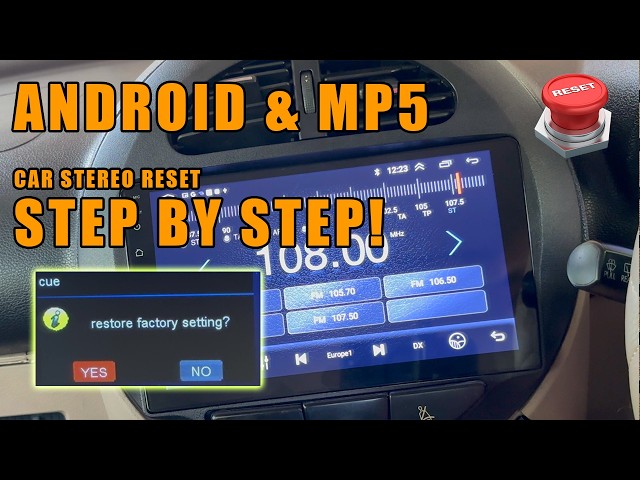
Picture this: you’re all set for a drive, ready to enjoy your favorite tunes, but suddenly, your car stereo seems to have a mind of its own. It’s frustrating, right?
You might find yourself thinking, “How do I reset this thing? ” Whether your stereo is stuck on one station or the sound is all off, knowing how to reset it can save you time and hassle. Resetting your car stereo isn’t just about pushing a few buttons; it’s about restoring your peace of mind and bringing back the joy of driving.
In this guide, we’ll show you the simple steps to get your stereo back on track, ensuring your drive is filled with music that matches your mood. Stick around, because the solution is easier than you think.

Credit: www.youtube.com
Common Reasons For Resetting
Common Reasons for Resetting Car stereo resets might be needed due to software glitches, unresponsive systems, or after battery changes. These issues can disrupt your stereo’s performance, making a reset essential for restoring functionality.
Resetting a car stereo can solve many issues. Sometimes, you face problems that seem tricky but are easy to fix. A reset may restore your stereo to its original state. Understanding why a reset is necessary helps in maintaining your stereo’s performance. Let’s explore some common reasons for resetting your car stereo.Power Fluctuations
Power fluctuations can disrupt your stereo. Sudden changes in the power supply might affect its functions. Resetting can often clear these glitches. It helps restore normal operation quickly.Software Glitches
Software glitches are another common reason. Your stereo may freeze or not respond. A reset can resolve minor software bugs. It brings back smooth functionality and enhances user experience.Customization Overload
Too many custom settings can overwhelm your stereo. Adjusting the sound, display, and other features can cause conflicts. Resetting removes these conflicts. It offers a fresh start, allowing you to reconfigure settings as needed.Bluetooth Connection Problems
Bluetooth connection issues can be frustrating. Sometimes, devices fail to pair correctly. A reset can help clear old pairing data. This makes it easier to establish new connections.Installation Errors
Incorrect installation can lead to stereo problems. Wires might be misplaced or settings wrongly configured. Resetting can correct these errors. It ensures the stereo functions as intended.General Maintenance
Regular resets can be part of maintenance. They help keep the stereo running smoothly. Resetting clears unnecessary data and improves performance. It’s a simple way to keep your stereo in top shape.
Credit: autorepairlebanontn.com
Preparation Before Reset
Resetting your car stereo can breathe new life into your driving experience, offering clarity and performance as if it were brand new. However, before you jump into the reset process, preparation is key. Ensuring you have all the necessary tools and a thorough understanding of your stereo model will make the task smoother and prevent any potential hiccups. Let’s dive into how you can prepare effectively for a successful reset.
Gather Necessary Tools
Before you start, make sure you have all the tools you might need. Typically, you’ll need a screwdriver to access the stereo unit. Some stereos require specific screwdrivers, so check your model beforehand.
It’s also wise to have a flashlight handy. You might need to peer into dark corners or find screws that are hard to see. A magnifying glass can be useful too, especially if your stereo has tiny components or intricate wiring.
Having a notepad or your smartphone to jot down any settings you want to remember before the reset is also beneficial. It saves time and ensures you can easily restore your favorite configurations post-reset.
Understand The Stereo Model
Understanding your stereo model is crucial. Different models have unique reset procedures, and knowing these can save you a lot of frustration. Check your car manual or the stereo’s specific guide for detailed instructions.
If you don’t have the physical manual, search online using your stereo’s model number. Manufacturers often provide digital manuals on their websites. Familiarizing yourself with these resources will give you confidence in tackling the reset.
Consider joining online forums or communities dedicated to your car or stereo brand. People often share insights and tips that aren’t covered in manuals, offering real-world solutions to common problems.
Identify Your Stereo Type
Resetting a car stereo often involves disconnecting the battery or pressing a reset button. Consult your car’s manual for specific instructions. This simple process can resolve common stereo issues and restore factory settings.
Identifying your car stereo type is crucial before resetting. Different stereos require different reset methods. Knowing your stereo type will guide you in the right direction.Factory Vs Aftermarket Stereos
Factory stereos come pre-installed in your car. They are designed by the car manufacturer. These systems are often integrated with other car functions. Resetting them might involve specific steps. You may need to consult the car’s manual. Aftermarket stereos are installed after purchasing the car. They are often customizable and feature-rich. The reset process can vary by brand and model. Check the stereo’s manual for guidance.Navigation And Touchscreen Systems
Navigation and touchscreen systems are common in modern cars. They offer GPS and multimedia functions. Resetting these systems can be more complex. Often, a reset button is hidden within settings. Some models require a combination of button presses. Always refer to the user manual for precise steps. Understanding these types will help you reset your stereo correctly. Each type has unique characteristics and reset methods.Basic Reset Steps
Resetting a car stereo often involves disconnecting the battery for a few minutes to reset the system. Checking the user manual for specific reset instructions tailored to your stereo model can be helpful.
Resetting your car stereo can be a surprisingly simple task. Whether your stereo is frozen, malfunctioning, or just not responding as it should, a basic reset may solve the issue and bring your tunes back to life. Many car owners face this dilemma, often wondering if they need professional help or if they can tackle it themselves. The good news is, you have a few straightforward options to reset your stereo, and you don’t need to be tech-savvy to do it. Let’s dive into some basic reset steps that you can follow to get your stereo back on track.Power Button Reset
One of the simplest ways to reset your car stereo is by using the power button. Have you ever tried turning your stereo off and on again? It sounds basic, but it often works wonders. Simply press and hold the power button for about 10 seconds. This action is akin to rebooting your computer—sometimes a quick reset is all your stereo needs to start functioning properly again.Fuse Box Method
If the power button reset doesn’t do the trick, consider checking the fuse box. Your car’s stereo system is connected to the electrical system through a fuse. Locate the fuse that corresponds to your stereo in the fuse box, usually found under the dashboard or in the engine compartment. Carefully remove the fuse and inspect it. If it appears blown, replace it with a new one of the same amperage. Before you start, make sure you know what you’re doing. A wrong move could affect other systems in your car. Why not take a moment to familiarize yourself with your car’s manual? Knowing where the fuse box is and understanding the fuse layout can save you time and trouble.Advanced Reset Techniques
Resetting a car stereo involves disconnecting the battery for a few minutes. Alternatively, pressing the reset button can help. Another way is using the factory settings option in the stereo menu.
Advanced reset techniques can fix stubborn issues with car stereos. Sometimes simple resets aren’t enough. Here, you’ll find techniques that delve deeper. These methods can help when the stereo is stuck. Let’s explore how battery disconnection and software reset procedures can assist.Battery Disconnection
Disconnecting the battery is a powerful reset method. Begin by turning off the car and removing the keys. Locate the battery under the hood. Use a wrench to loosen the negative terminal clamp. Carefully lift the cable away from the battery. Wait for about 15 minutes to ensure a complete discharge of residual power. Reconnect the cable and tighten the clamp securely. This process clears old settings and glitches.Software Reset Procedures
Software resets involve navigating the stereo’s menu. Start by turning on the stereo. Use the menu button to access settings. Look for options like “Factory Reset” or “System Reset”. Select the appropriate option and confirm the reset. Some models might require holding specific buttons. Check the manual for your model’s exact procedure. This method restores original software configurations.
Credit: mobileaudioconcepts.com.au
Post-reset Checklist
Resetting a car stereo typically involves disconnecting the battery or pressing a reset button. Check your car’s manual for specific instructions. This process helps resolve issues like freezing or connectivity problems.
After resetting your car stereo, it’s crucial to ensure everything is functioning correctly. This post-reset checklist helps verify that your stereo is working as intended. Follow these simple steps to get the most out of your car audio system.Reconfigure Settings
- Set the time and date on your stereo display.
- Choose your preferred language for ease of use.
- Adjust bass, treble, and balance for optimal sound.
- Reconnect to Bluetooth devices for hands-free calling.
- Save your favorite radio stations for quick access.
Test Sound And Functionality
- Play music to check speaker clarity and volume.
- Switch between audio sources like radio and AUX.
- Verify that the touchscreen responds accurately.
- Ensure the remote control works properly.
- Test USB ports and CD player for functionality.
Troubleshooting Tips
Resetting a car stereo involves turning off the car and removing the key. Press and hold the reset button for a few seconds until the system reboots. This can resolve issues like unresponsive screens or connection problems.
Resetting a car stereo can sometimes feel like solving a complex puzzle. You press buttons, follow instructions, and yet the stereo refuses to cooperate. But before you throw in the towel, there are some troubleshooting tips that might just save your day. Maybe you’ve had the frustrating experience of your favorite station disappearing or your Bluetooth refusing to connect. You’re not alone. Understanding these common glitches can help you address them effectively. Let’s dive into some practical solutions that could bring your stereo back to life.Dealing With Persistent Issues
If your car stereo continues to act up despite resets, it’s time to dig a little deeper. First, check the owner’s manual for any specific reset instructions tailored to your stereo model. Manuals often include unique sequences or button combinations that you might have missed. Additionally, inspect the stereo’s connections. Loose wires or faulty connections can be the silent culprits behind persistent issues. Ensure all cables are secure and in their correct positions. A simple reconnection might just restore your stereo’s functionality.When To Seek Professional Help
Sometimes, despite your best efforts, the stereo remains stubborn. If you’ve tried various troubleshooting methods without success, it might be wise to consult a professional. Car audio specialists can diagnose and fix issues that are not immediately visible. Consider the cost of professional help against the potential for a complete stereo failure. Investing in expert assistance might save you from more expensive repairs down the line. Plus, professionals can provide insights into upgrades or enhancements, offering you more than just a quick fix. Have you ever faced a stereo issue that just wouldn’t resolve? Knowing when to ask for help can be the difference between ongoing frustration and smooth, enjoyable drives.Frequently Asked Questions
How Do I Reset My Car Stereo System?
To reset your car stereo, first, turn off your vehicle. Then, locate the stereo reset button, usually found on the front panel. Press and hold it for a few seconds. If your stereo lacks a reset button, consult the user manual for specific instructions.
Why Is My Car Stereo Not Working?
A car stereo may not work due to blown fuses, faulty wiring, or software glitches. Resetting the stereo can often resolve software issues. If the problem persists, check the fuses or consult a professional for further diagnostics and repairs.
Can Resetting Fix Car Stereo Issues?
Yes, resetting can fix minor software glitches in car stereos. It restores the stereo to its factory settings, resolving temporary issues. However, hardware problems will require professional attention. Always consult the user manual for proper reset instructions to avoid further complications.
What Are Signs My Stereo Needs Resetting?
Signs include unresponsive buttons, distorted sound, or failure to turn on. If your stereo isn’t functioning as expected, a reset can often resolve these issues. It’s a quick troubleshooting step that can restore normal operation without the need for professional help.
Conclusion
Resetting a car stereo can seem tricky, but it’s manageable. Follow the steps carefully. Ensure you have the right tools. Disconnect the battery as needed. Sometimes, a simple reset solves issues. Keep your owner’s manual handy. It guides you through specific models.
Always check connections before and after resetting. This prevents future problems. If issues persist, consult a professional. They’re equipped to handle complex stereo systems. Regular maintenance helps avoid frequent resets. Keep your stereo clean and functional. Enjoy your music and drive safely!